
Amazon Fire HD 8 Tablet (2024, 8" HD, 32GB) – Compact Entertainment Slate Reviewed
Overview
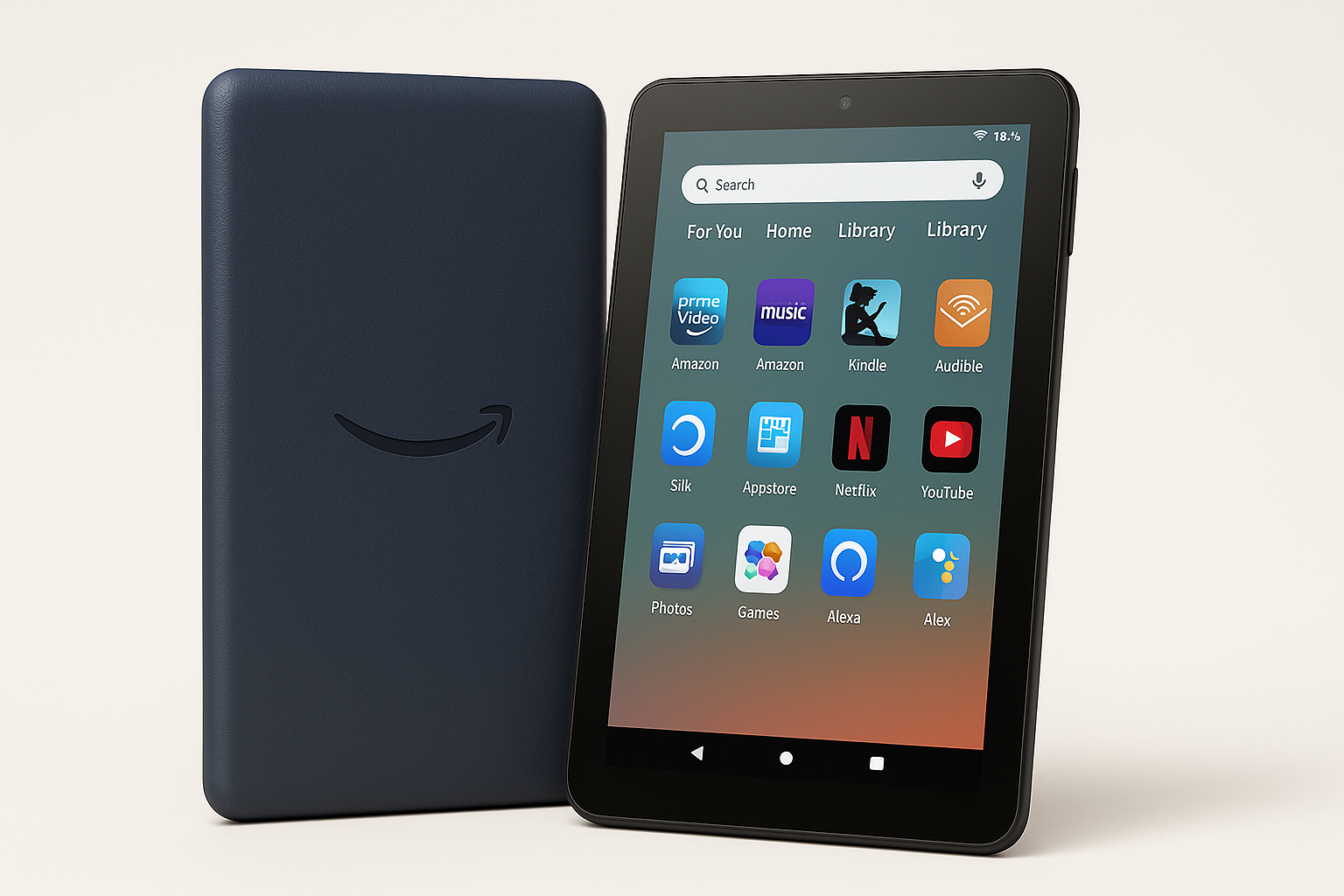
The Amazon Fire HD 8 tablet (2024 release) is built as a portable entertainment hub rather than a do‑everything productivity device. With an 8‑inch HD display, 3GB of RAM, 32GB of internal storage, and Fire OS 8, it’s aimed at users who primarily want to stream movies, browse the web, read, and play casual games in a compact, budget‑friendly form factor.
Instead of competing head‑on with premium Android or iPad tablets, the Fire HD 8 leans on Amazon’s services—Prime Video, Kindle, Audible, Amazon Music, and Alexa—to deliver strong value at around $0.00. That makes it particularly attractive as a secondary device for the couch, travel, or kids, provided you’re comfortable in Amazon’s ecosystem.
Standout Features
8‑inch HD Display
The Fire HD 8 offers an 8‑inch display with a 1280 x 800 resolution. This is HD rather than Full HD, but on an 8‑inch panel it’s adequate for streaming video, reading comics, and casual browsing. Colors are reasonably vibrant and brightness is sufficient for indoor use and shaded outdoor environments.
3GB RAM and 32GB Storage (Expandable)
With 3GB of RAM, the tablet handles typical multitasking—switching between a browser, streaming app, and an eBook reader—better than older Fire HD 8 generations that shipped with less memory. The 32GB of internal storage is modest, but the microSD slot lets you significantly expand capacity, making it easy to store downloaded videos, games, and eBooks offline.
Tight Integration with Amazon Services
Fire OS 8 puts Amazon’s services front and center. Prime Video, Kindle, Audible, and the Amazon Appstore are pre‑integrated, so it’s very quick to set up if you already have an Amazon account. Content discovery (e.g., recommending shows or books based on your history) is a major part of the experience.
Alexa Voice Assistant
Alexa is built into the Fire HD 8, allowing for hands‑free or push‑to‑talk queries. You can ask for the weather, control compatible smart‑home devices, start a playlist, or open apps. This is particularly convenient if the tablet is used as a shared family device in common spaces like the kitchen or living room.
Portable and Lightweight Design
The 8‑inch form factor keeps the device compact and lightweight, making it easier to hold for extended reading sessions or to toss in a small bag. It’s well‑suited to travel, commuting, or as a device for kids due to its relatively durable plastic construction.
Supporting Features
Fire OS 8 and App Ecosystem
Fire OS 8 is Amazon’s fork of Android, customized around Amazon’s storefronts and services. The interface is straightforward, with content‑centric home screens and quick access to media, games, and books.
The main trade‑off is the app ecosystem: you access apps through the Amazon Appstore rather than Google Play by default. Many major streaming and social apps are present, but some niche or productivity applications may be missing or require workarounds.
Connectivity and Ports
- Wireless: Wi‑Fi and Bluetooth are standard, enabling streaming, web access, and pairing of headphones or speakers.
- Charging and Data: The tablet uses USB‑C, which is more convenient and modern than older micro‑USB ports.
- Audio: A headphone jack and built‑in speakers provide flexibility. The speakers are fine for casual viewing but not a replacement for a dedicated Bluetooth speaker.
Cameras
Front and rear cameras are basic, oriented more toward video calls and occasional snapshots than serious photography. They are serviceable for Zoom calls, children’s use, and simple document captures.
Usability
Setup and Everyday Navigation
Initial setup is simple, especially for existing Amazon users: sign into your Amazon account, and most of your purchased content and preferred apps are quickly accessible. The UI is icon‑driven with clear labels, so first‑time tablet users and children can navigate it with minimal guidance.
The home screen emphasizes content categories—Home, Library, Store—which can be an advantage if you want quick access to media. However, users who prefer a more traditional Android‑style app drawer may find the layout opinionated.
Ergonomics
The Fire HD 8 is comfortable for one‑handed or two‑handed use thanks to its moderate weight and rounded edges. It’s a good size for reading eBooks or browsing without feeling top‑heavy. The plastic shell feels sturdy, and there are plenty of third‑party cases and folios that can add grip, protection, and stand functionality.
Parental and Family Use
For families, Amazon’s profiles and parental controls are strong selling points. Adults can create child profiles with screen‑time limits, content filters, and app restrictions. Combined with optional subscription services focused on kids’ content, the Fire HD 8 works well as a controlled media device for younger users.
Performance
Day‑to‑Day Speed
For its class, the Fire HD 8 delivers acceptable performance. Basic tasks—launching apps, browsing the web, scrolling through social feeds, and streaming HD content—are smooth enough for most users. The 3GB of RAM reduces app reloads compared with older, lower‑memory Fire tablets.
You may still notice occasional pauses or stutters when switching rapidly between multiple heavier apps or loading complex web pages. This is expected at this performance tier and price point, but not typically disruptive to media‑first usage.
Gaming and Graphics
The device is best suited for casual games and lighter titles from the Amazon Appstore. Simple puzzle, card, and kids’ games run fine. More demanding 3D games may require lower settings, take longer to load, or show frame‑rate drops. If gaming is your primary use case, a more powerful tablet would be advisable.
Battery Life
Battery life is one of the Fire HD 8’s strengths. With moderate mixed use—streaming video, browsing, reading, and some gaming—you can generally expect a full day on a single charge, and often longer if your use is skewed toward reading or lighter tasks. This endurance makes it particularly convenient for travel and situations where power outlets are not always available.
Pros and Cons
Pros
- Compact 8‑inch HD display that’s comfortable to hold and carry
- 3GB of RAM offers smoother everyday performance than earlier Fire HD 8 models
- 32GB of storage plus microSD expansion for offline media and apps
- Deep integration with Amazon’s content ecosystem (Prime Video, Kindle, Audible, etc.)
- Built‑in Alexa for hands‑free commands and smart‑home control
- Strong battery life suitable for travel and all‑day casual use
- Competitive pricing around $0.00, giving it solid value for budget‑minded buyers
- User‑friendly interface and robust parental controls for family use
Cons
- Fire OS relies on the Amazon Appstore, which is more limited than Google Play
- HD resolution is adequate but not as sharp as 1080p alternatives
- Performance can lag with heavier multitasking or demanding games
- Cameras are basic and best reserved for video calls or quick snapshots
- Plastic build is practical but feels less premium than higher‑end tablets
Summary
The 2024 Amazon Fire HD 8 tablet is a focused product: a compact, budget‑friendly device optimized for media consumption within Amazon’s ecosystem. Its 8‑inch HD display, 3GB of RAM, 32GB of expandable storage, and long battery life make it a practical choice for streaming, reading, and casual apps at home or on the go.
It’s not designed to replace a laptop or high‑end tablet for productivity, and the reliance on the Amazon Appstore instead of Google Play is an important consideration. However, if your priorities are affordability, portability, and easy access to Amazon’s content and Alexa, the Fire HD 8 represents strong value at its $0.00 price point and is especially compelling as a secondary household device or family tablet.