
Amazon Fire TV Stick 4K (2023): Compact 4K Streaming with Wi‑Fi 6 and Dolby Vision
Introduction
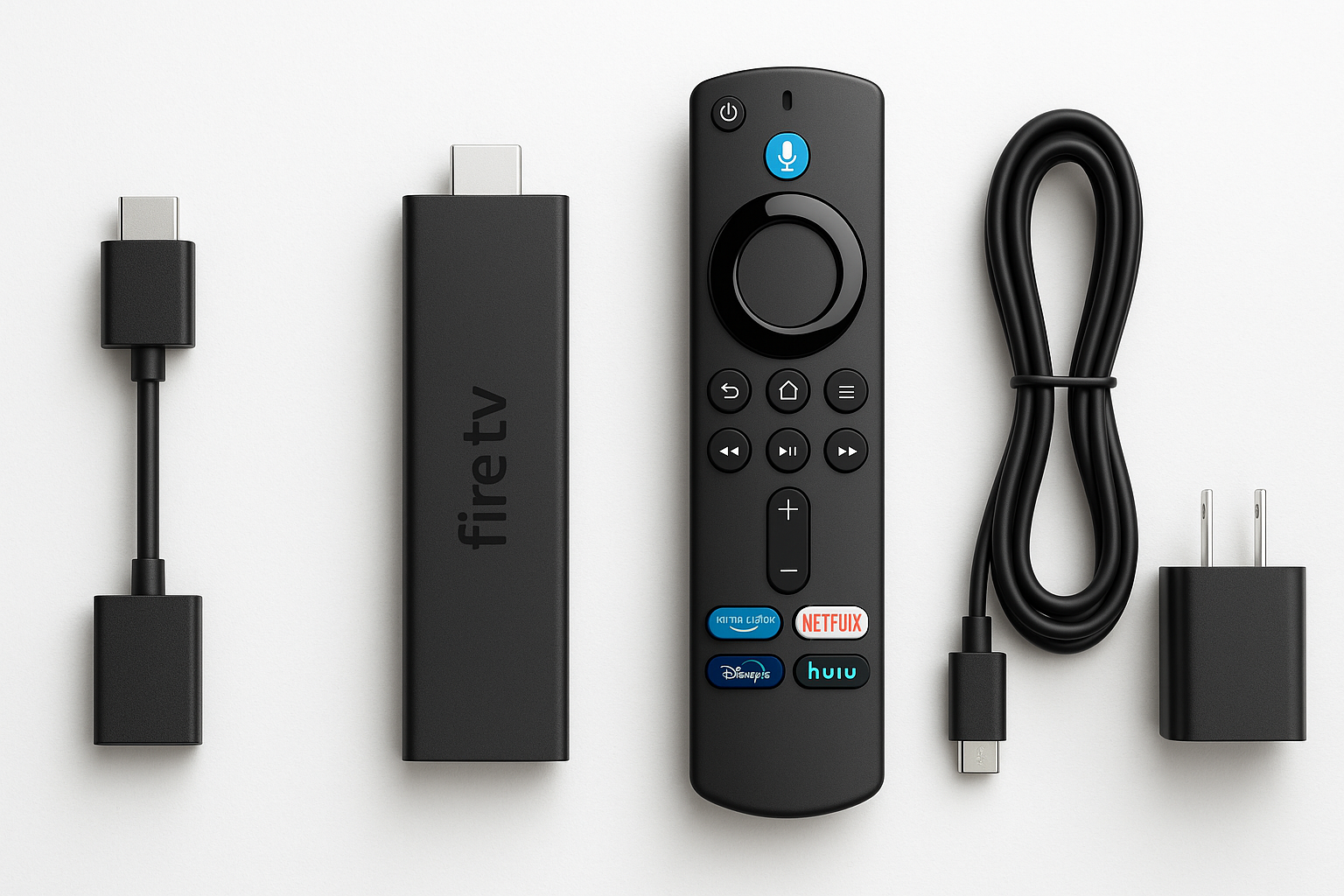
The Amazon Fire TV Stick 4K (2023 release) is a plug‑and‑play HDMI streaming stick built for 4K home entertainment. It supports up to 4K Ultra HD resolution with HDR10, HDR10+, HLG, and Dolby Vision, plus Dolby Atmos for compatible sound systems. Combined with Wi‑Fi 6 support and the Alexa Voice Remote, it aims to deliver smooth streaming, responsive navigation, and tight Alexa integration in a small, travel‑friendly form factor.
Positioned as a mainstream 4K streamer, the Fire TV Stick 4K targets users who want high‑quality video and audio without moving to a full‑blown set‑top box. At around $34.97 on Amazon, it’s designed to be accessible for upgrading older TVs or adding smart features to secondary screens.
Typical Use Cases
1. Everyday 4K Streaming on the Living‑Room TV
For many buyers, the core use case is simple: plug the Fire TV Stick 4K into an HDMI port on a primary TV and use it as the main streaming hub. In this scenario, it serves as the central interface for apps like Prime Video, Netflix, Disney+, Hulu, Max, YouTube, and more.
What this looks like in practice:
- Navigating the Fire OS home screen to jump between apps
- Streaming 4K HDR movies and series on compatible TVs
- Using Alexa voice commands to search content by title, actor, or genre
- Controlling TV power and volume with the included remote (on supported TVs and soundbars)
2. Upgrading an Older 1080p or Non‑Smart TV
Owners of older HDTVs or basic smart TVs with sluggish built‑in apps often use the Fire TV Stick 4K as an upgrade path. Even when the TV itself isn’t 4K capable, the Fire TV interface is usually faster and more feature‑rich than legacy platforms, and it can future‑proof your setup if you move the stick to a 4K TV later.
Typical behavior here:
- Replacing slow or unsupported built‑in apps with Fire OS versions
- Gaining access to newer services that may not exist on older TV app stores
- Benefiting from regular OS and app updates via Amazon
3. Bedroom or Secondary Room Streamer
Because the Fire TV Stick 4K is compact and powered over USB/AC, it’s ideal for secondary spaces, such as bedrooms, guest rooms, or offices. It offers the same app catalog and interface as in the living room, giving a consistent experience across rooms.
Common use cases:
- Setting up a separate profile or watch list in another room
- Using parental controls for kids’ TVs
- Keeping a portable streamer you can easily move between TVs
4. Travel Companion for Hotels and Airbnbs
Frequent travelers can use the Fire TV Stick 4K with hotel or Airbnb TVs, as long as those TVs have an available HDMI input and you can authenticate to the local Wi‑Fi.
In real‑world travel:
- Plugging into a hotel TV’s HDMI port and using the included remote
- Signing in via captive portals (note: can sometimes be hit‑or‑miss depending on the Wi‑Fi setup)
- Bringing your own streaming subscriptions and profiles instead of relying on hotel content
5. Smart Home and Voice Control Hub
For users already in the Alexa ecosystem, the Fire TV Stick 4K can function as a living‑room Alexa endpoint.
Examples:
- Using Alexa to control compatible smart lights, plugs, and thermostats from the TV
- Viewing compatible camera feeds (e.g., video doorbells, baby monitors) on the big screen
- Asking for weather, sports scores, or quick information hands‑free (via the remote’s microphone button)
Performance in Each Scenario
1. Living‑Room 4K Streaming Performance
In a typical living‑room setup with a modern 4K TV and stable home internet, the Fire TV Stick 4K performs well for its class:
- Video quality: 4K streams with Dolby Vision or HDR10/HDR10+ look sharp and vibrant on compatible displays. Color and contrast are noticeably improved compared to SDR content.
- Audio: With Dolby Atmos support, pairing the stick with a compatible soundbar or AV receiver adds immersive, object‑based audio for movies and shows that support it.
- Responsiveness: App launches and navigation are generally snappy for a streaming stick, particularly once commonly used apps are cached.
- Wi‑Fi performance: Wi‑Fi 6 support helps maintain stable bitrates in crowded wireless environments, as long as your router supports Wi‑Fi 6 and is placed reasonably close.
Overall, it’s well‑suited to mainstream streaming in a primary living‑room environment, especially for viewers heavily invested in Prime Video and other major services.
2. On Older TVs and 1080p Displays
When attached to non‑4K or older HDTVs, the Fire TV Stick 4K scales its output accordingly while still running the same interface and apps.
- Picture: While you won’t see 4K detail, HD content still looks crisp, and the device can downscale higher‑resolution streams effectively.
- Speed vs. built‑in apps: On many older smart TVs, the Fire TV interface feels more responsive and consistent.
- Value: It can delay the need to replace a TV purely for smart features, making it a cost‑effective upgrade.
3. Secondary Rooms
In bedrooms and other secondary spaces, the Fire TV Stick 4K’s compact form factor and single‑remote control make it unobtrusive.
- Noise and heat: Operation is quiet; the stick gets warm in typical use but remains within normal parameters.
- User profiles and parental controls: These features are handled at the software level, giving flexibility for kids’ rooms or guest setups.
- Network: If Wi‑Fi coverage is weaker in secondary rooms, users may need to optimize router placement or add mesh nodes to maintain reliable 4K streaming.
4. Travel and Portable Use
For travel scenarios, performance is more dependent on the environment than the hardware itself.
- Hotel Wi‑Fi login flows: Some hotels use captive portals that require browser‑based sign‑in; the Fire TV interface supports this but it can be clumsy on certain networks.
- Power requirements: You may need to use the included power adapter if the TV’s USB port doesn’t provide enough power.
- Convenience: Once connected, it provides a familiar interface and access to your apps, which is a major convenience versus starting from scratch on every new TV.
5. Smart Home and Alexa Integration
As an Alexa endpoint connected to a large display, the Fire TV Stick 4K is effective for quick smart‑home interactions.
- Voice recognition: The remote’s built‑in microphone generally picks up commands reliably at typical seating distances.
- Smart home controls: Simple routines like dimming lights for movie night or checking camera feeds work smoothly once configured.
- Limitations: Since Alexa is accessed via the remote’s microphone rather than being always‑listening, you must press the voice button to speak commands.
Strengths Across Scenarios
-
Strong 4K HDR and Dolby Vision Support
The Fire TV Stick 4K supports a wide range of HDR formats (HDR10, HDR10+, Dolby Vision, HLG), allowing it to take full advantage of most modern 4K TVs. This flexibility is valuable if you upgrade or change TVs over time. -
Dolby Atmos Audio
When used with a compatible sound system, Dolby Atmos enables a more immersive audio experience for movies and high‑end TV shows. -
Wi‑Fi 6 for Crowded Homes
Wi‑Fi 6 support helps maintain steady streaming quality in homes with many connected devices. This is particularly useful for families with multiple streamers, gamers, and smart‑home devices all sharing the same network. -
Compact and Portable Design
The small HDMI stick format makes it easy to hide behind the TV, transfer between rooms, or pack for travel. Setup typically involves a few on‑screen steps and linking an Amazon account. -
Rich App Ecosystem and Fire OS Features
Fire OS supports the major streaming platforms, many niche services, and a range of utility apps. Features like watch lists, personalized recommendations, and user profiles add convenience. -
Alexa Voice Remote Integration
The included remote combines streaming controls with Alexa voice search and (on supported TVs and AV devices) TV power and volume control. This reduces remote clutter and simplifies daily use. -
Attractive Price‑to‑Feature Ratio
At approximately $34.97, the Fire TV Stick 4K undercuts many full‑size streaming boxes while still offering 4K HDR, Dolby Vision, and Wi‑Fi 6. For budget‑conscious buyers, that combination is compelling.
Limitations Across Scenarios
-
Amazon‑Centric Interface and Promotion
The Fire TV home screen places strong emphasis on Amazon services and recommendations. While you can access all major apps, users who prefer a more neutral or minimalist interface may find this layout busy and Prime‑centric. -
Limited Local Storage
With modest internal storage, heavy app users may need to periodically manage installed apps and cached data. This usually isn’t a problem for streaming‑only usage but can become noticeable if many apps are installed. -
No Ethernet Port Out of the Box
The device is Wi‑Fi only unless you purchase a separate Ethernet adapter. For households that prefer or require hard‑wired networking, this is an extra accessory and cable to manage. -
Dependent on HDMI and TV Compatibility
Some older TVs may have compatibility quirks, such as CEC issues that affect power or volume control. In rare cases, users may need to adjust TV settings to enable all features. -
Not Ideal for Heavy Local Media Playback
While there are apps that can stream from local servers (e.g., via Plex or similar), the Fire TV Stick 4K is primarily optimized for cloud streaming. Power users focused on local 4K Blu‑ray rips or advanced formats might prefer more open or powerful media boxes. -
Travel Networking Friction
In hotel environments, complex captive portals and restrictive Wi‑Fi setups can occasionally prevent the device from connecting smoothly.
Verdict
The Amazon Fire TV Stick 4K (2023) strikes a strong balance of features, performance, and cost for most streaming‑focused households. It delivers sharp 4K HDR video, Dolby Vision and Dolby Atmos support, and modern Wi‑Fi 6 connectivity in a compact form factor that works well in living rooms, bedrooms, and on the road.
Its greatest strengths lie in its broad app support, Alexa Voice Remote integration, and the overall value offered at around $34.97. Users who are already invested in Amazon’s ecosystem—or who primarily care about mainstream streaming apps and reliable 4K playback—will find it a capable and straightforward upgrade for almost any TV.
On the other hand, buyers who dislike Amazon‑centric interfaces, require extensive local media playback, or insist on built‑in Ethernet may want to consider alternative platforms or higher‑end streamers. For the majority of users, though, the Fire TV Stick 4K is an easy device to recommend as a cost‑effective way to bring modern 4K streaming and smart‑home features to new and old TVs alike.