
Amazon Fire TV Stick 4K Plus Review: A Subtle but Solid Upgrade for 4K Streaming
Introduction
The Amazon Fire TV Stick 4K Plus (newest model) is Amazon’s latest 4K streaming stick, designed for users who want sharp Ultra HD video, robust HDR support, and hands‑free convenience through Alexa. It slots in beneath the Fire TV Stick 4K Max in Amazon’s lineup, but brings welcome refinements like AI‑powered Fire TV Search and Wi‑Fi 6 connectivity, while keeping the familiar stick‑style design that plugs directly into an HDMI port.
Available around $49.99 on Amazon (often less during sales), the Fire TV Stick 4K Plus targets people upgrading older HD or early 4K streamers, or those looking to standardize on the Fire TV ecosystem across multiple TVs.
Product overview and key features
At a glance, the Fire TV Stick 4K Plus looks like a typical HDMI streaming dongle, but its internal hardware and software bring it firmly into the modern streaming era.
Design and hardware
- Form factor: Compact stick that plugs into an HDMI port on the back or side of your TV.
- Resolution: Up to 4K Ultra HD on compatible TVs.
- HDR formats: Support for Dolby Vision, HDR10, and HDR10+, delivering better contrast and color on supported displays.
- Audio: Capable of outputting Dolby Atmos when paired with a compatible soundbar or receiver and Atmos‑enabled content.
- Processor & memory: Quad‑core processor with sufficient RAM to keep the interface responsive and handle modern streaming apps.
- Storage: 8 GB onboard storage for apps and cached data, typical for a streaming stick in this class.
- Connectivity: Wi‑Fi 6 (802.11ax) support on 2.4 GHz and 5 GHz for more stable streaming in congested wireless environments.
While not as powerful as the top‑tier Fire TV Cube, the Fire TV Stick 4K Plus offers enough performance for smooth playback and everyday app usage on most 4K TVs.
Alexa Voice Remote and AI‑powered search
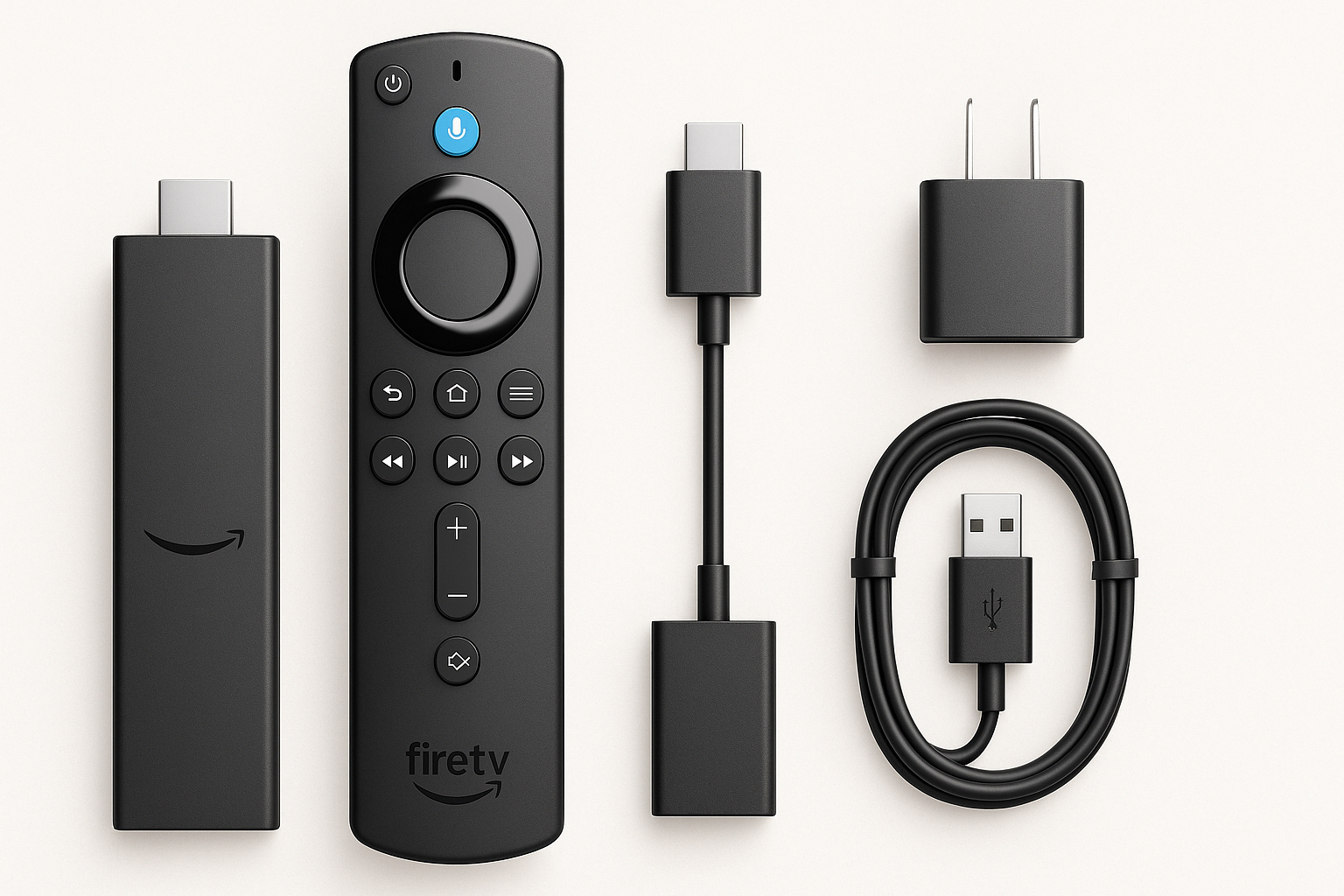
The included Alexa Voice Remote retains the layout Fire TV users will recognize:
- Microphone button for voice search and commands
- Directional pad and playback controls
- Dedicated power and volume buttons to control compatible TVs, soundbars, and AV receivers
The big software addition is AI‑powered Fire TV Search, which aims to make finding content faster and more natural. Instead of manually digging through multiple apps, you can ask things like:
- “Show me sci‑fi movies from the last five years.”
- “Find comedies that are less than two hours long.”
- “What should I watch tonight?”
Fire TV aggregates results across major streaming services, helping reduce app‑hopping and surfacing more relevant recommendations.
Content and services
Out of the box, the Fire TV Stick 4K Plus supports all the major streaming platforms most people expect, including (where available):
- Prime Video, Netflix, Disney+, Hulu, Max, Apple TV+, YouTube, and many others
- A large selection of free, ad‑supported streaming apps providing movies, TV, and specialty channels
- Live TV integration, including support for various live TV apps and Amazon’s own free & live TV hub
If you’re heavily invested in the Amazon ecosystem, you’ll also get tight integration with Amazon Music, Alexa skills, and cross‑device features like watchlists and recommendations.
Smart home and ecosystem integration
Because it’s an Alexa‑enabled device, the Fire TV Stick 4K Plus serves as a convenient smart home control point on your TV screen:
- View compatible security cameras and video doorbells
- Control smart lights, plugs, and thermostats
- Get at‑a‑glance info such as weather and timers
This can make it especially appealing if your home is already built around Alexa devices like Echo speakers and displays.
Performance and user experience
Setup and interface
Setup is straightforward:
- Plug the Fire TV Stick 4K Plus into an available HDMI port.
- Connect the included USB power cable and adapter.
- Pair the Alexa Voice Remote.
- Sign in with your Amazon account and follow the on‑screen prompts.
The Fire TV interface is familiar and content‑forward, with a home screen that highlights:
- Recently used apps and channels
- Personalized recommendations
- Rows of featured movies, series, and live channels
Some users may find Amazon’s promotional content on the home screen a bit heavy‑handed, but in day‑to‑day use, the layout is quick to navigate once you’ve arranged your favorite apps.
Streaming quality and Wi‑Fi 6 benefits
With a good broadband connection, the Fire TV Stick 4K Plus delivers crisp 4K video with HDR on supported titles. The combination of Dolby Vision/HDR10+ and compatible TVs yields noticeably improved dynamic range and color compared to standard HD.
Wi‑Fi 6 support is particularly helpful in households with multiple devices or in apartments with crowded wireless networks. It doesn’t magically increase your ISP bandwidth, but it can:
- Reduce buffering when multiple people are streaming
- Improve stability for 4K content
- Provide faster app updates and navigation responsiveness
In practical terms, this means fewer interruptions and smoother playback compared with older 802.11n/ac‑only sticks, assuming your router also supports Wi‑Fi 6.
AI‑powered search and voice control in practice
The upgraded AI‑powered Fire TV Search is one of the main reasons to choose this newest model:
- Voice queries are generally fast and accurate.
- Search results pull from multiple apps, giving you options to watch via different services.
- More conversational requests (e.g., mood‑based or genre‑plus‑timeframe) tend to work better than on older Fire TV models.
Alexa still handles the usual voice assistant tasks — from weather and sports scores to smart home scenes — but the search improvements make the Fire TV Stick 4K Plus feel more like a content concierge than a simple remote.
App performance and gaming
Navigating between apps, opening popular streaming services, and browsing large libraries feels snappy for a mid‑range streaming stick. Loading times are similar to or better than prior 4K sticks from Amazon, depending on your network conditions.
For gaming, the Fire TV Stick 4K Plus can:
- Run casual Android‑style games from the Amazon Appstore.
- Leverage cloud gaming services (where supported) such as Xbox cloud gaming and Amazon’s Luna with a compatible Bluetooth controller.
It’s not a replacement for a console or dedicated gaming PC, but it’s more than adequate for light gaming and streaming‑based titles.
Pros and cons
Pros
- 4K Ultra HD with Dolby Vision, HDR10, and HDR10+ support for improved picture quality on modern TVs.
- AI‑powered Fire TV Search makes finding content across apps faster and more intuitive.
- Wi‑Fi 6 support improves wireless stability and performance in busy environments.
- Alexa Voice Remote with TV power and volume controls reduces the number of remotes needed.
- Deep integration with Amazon’s ecosystem, including Prime Video, Amazon Music, and Alexa smart home.
- Access to hundreds of thousands of movies and shows, plus a robust selection of free and live TV channels.
- Compact, travel‑friendly form factor; easy to move between TVs or take on trips.
Cons
- Fire TV home screen continues to feature prominent sponsored and Amazon‑promoted content, which some users may find cluttered.
- 8 GB of storage can feel limiting if you install many apps and games.
- Performance, while solid, is still a step below the Fire TV Cube and some higher‑end boxes for heavy multitasking.
- Best experience assumes you’re comfortable with, or already using, Alexa and Amazon services.
- Not a major leap over recent 4K Fire TV sticks; existing Fire TV Stick 4K or 4K Max owners may see only incremental benefits.
Conclusion and recommendation
The Amazon Fire TV Stick 4K Plus (newest model) is a thoughtful refinement of Amazon’s mainstream 4K streaming stick. It doesn’t radically reinvent the platform, but it delivers the features most people care about today:
- Reliable 4K HDR streaming with Dolby Vision and HDR10+
- Wi‑Fi 6 for more stable performance in busy households
- A more capable, AI‑driven search experience powered by Alexa
If you’re upgrading from an older HD Fire TV Stick or a first‑generation 4K streamer, the jump in responsiveness, wireless reliability, and picture quality will feel significant. For new buyers in the Amazon ecosystem, the Fire TV Stick 4K Plus at around $49.99 offers strong value as a primary or secondary streaming device.
However, if you already own a recent Fire TV Stick 4K Max or prefer a platform with fewer sponsored tiles on the home screen, the benefits may be too modest to justify replacing what you have.
Overall, the Fire TV Stick 4K Plus is easy to recommend for most users seeking an affordable, future‑ready 4K streaming stick with deep Alexa integration and a very large content library. It’s not the flashiest device in Amazon’s lineup, but it’s likely the one that will make the most sense for the greatest number of living rooms.