
Amazon Fire TV Stick HD (Newest Model) Review: Affordable Full HD Streaming with Alexa and Smart Home Control
Introduction
The Amazon Fire TV Stick HD (newest model) is Amazon’s latest entry-level streaming stick aimed at users who care more about smooth Full HD playback and ease of use than cutting-edge 4K or premium audio formats. Plug it into an HDMI port, connect to Wi‑Fi, and you get a clean Fire TV interface with access to popular apps like Netflix, Prime Video, Disney+, Hulu, and many more, plus a deep catalog of free, ad-supported content.
Despite its compact design and modest hardware, this 2024/2025-generation Fire TV Stick HD offers a notable upgrade over earlier HD sticks, including improved processing, updated Fire OS, and more robust wireless connectivity. Combined with the Alexa Voice Remote and smart home integration, it aims to be a straightforward, affordable way to modernize an older TV or to replace a sluggish built‑in smart TV platform.
Pricing is positioned firmly in the budget category; you’ll often find the Fire TV Stick HD marked down from its regular list price to promotional levels around $19.99, making it one of the more wallet‑friendly mainstream streaming options.
Key Points
- Resolution & video: Streams up to Full HD (1080p) with HDR support, ideal for non‑4K TVs or secondary screens.
- Processor & memory: Quad‑core 1.7 GHz CPU with 1 GB RAM and 8 GB of internal storage for apps and cached content.
- Wireless connectivity: Dual‑band Wi‑Fi (spec’d as Wi‑Fi 5 or Wi‑Fi 6 depending on region and batch) for stable HD streaming. (developer.amazon.com)
- Operating system: Runs Amazon’s Fire OS (version 7 or 8, again depending on model revision) with the familiar Fire TV interface, app store, and Alexa integration. (developer.amazon.com)
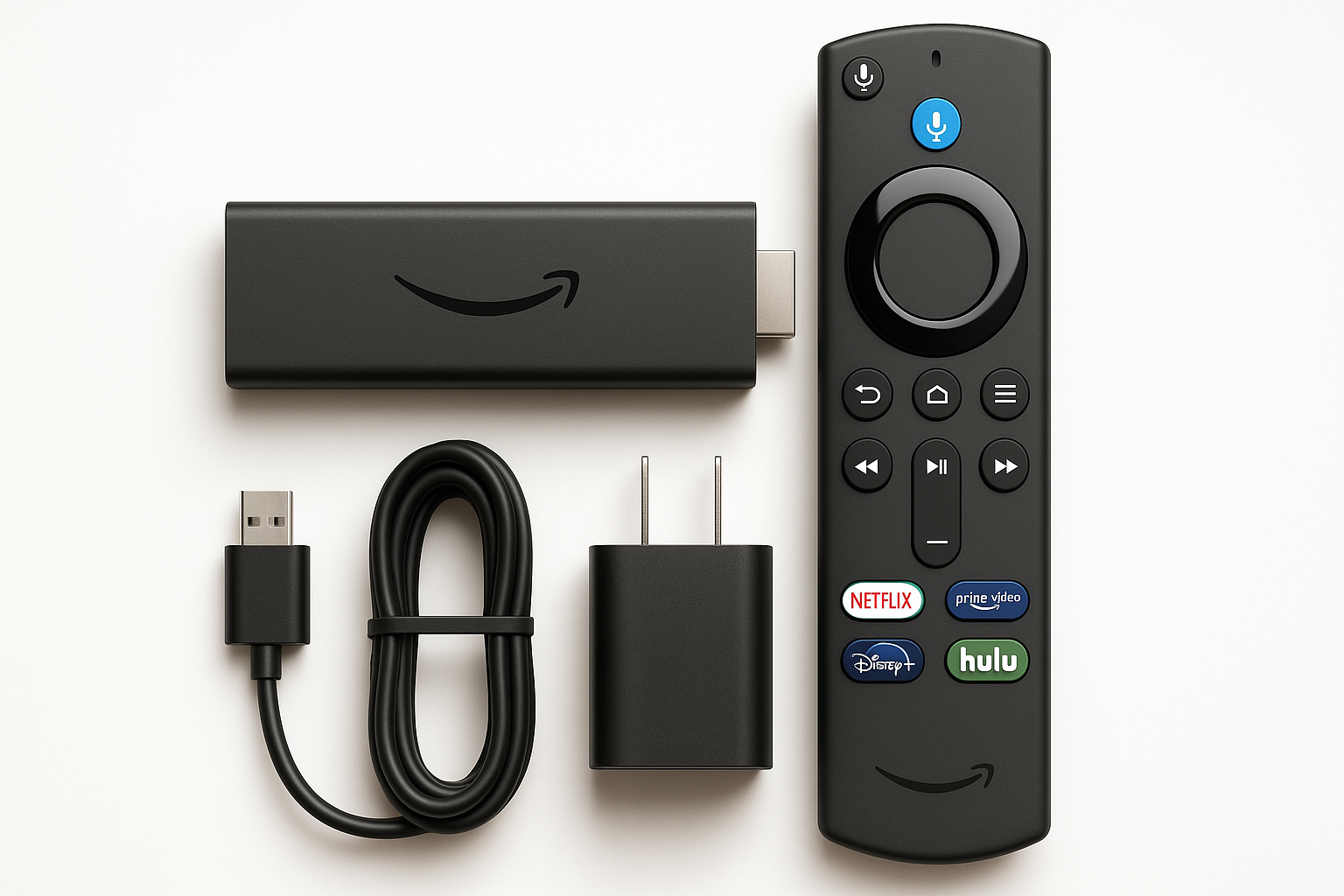
- Alexa Voice Remote: Includes the newer‑generation Alexa Voice Remote with microphone, navigation controls, and TV power/volume buttons so one remote can handle most day‑to‑day tasks.
- Content selection: Access to major paid services plus over 300,000 free movies and TV episodes via ad‑supported apps like Amazon Freevee, Tubi, and Pluto TV. (staples.com)
- Smart home controls: Use Alexa to control compatible lights, plugs, cameras, and other devices, and to get quick info like weather, sports scores, and calendar updates.
- Audience: Best suited for 1080p TVs, budget shoppers, guest rooms, dorms, offices, or anyone who wants a simple streaming upgrade without paying for 4K features they won’t use.
Experience
Setup and First‑Time Use
Initial setup is straightforward and takes only a few minutes in typical conditions:
- Plug the Fire TV Stick HD into an available HDMI port on your TV.
- Connect the included USB power cable and adapter.
- Pair the Alexa Voice Remote by following the on‑screen prompt.
- Connect to your Wi‑Fi network and sign in with (or create) an Amazon account.
Once the basics are complete, the device walks you through default configurations such as enabling parental controls, selecting popular apps to auto‑install, and optionally linking Alexa skills or smart home devices. For most households, this is a one‑time process.
Interface and Navigation
The Fire TV interface has matured considerably and feels optimized for remote‑driven navigation:
- Home screen: Highlights recently used apps, recommended content, and Amazon services like Prime Video.
- App rows and categories: Streaming apps, live TV, and games are organized by category, and you can pin your favorites to the top row for quick access.
- Search: Voice search via the microphone button on the remote is generally faster than typing, especially for long show or movie titles.
On this HD stick, menu performance is snappy for an entry‑level device. Scrolling across rows, launching popular apps, and switching between services are noticeably faster than many older smart TVs and legacy Fire TV sticks, though not as instantaneous as Amazon’s flagship 4K Max models.
Streaming Quality
For a 1080p‑focused product, the Fire TV Stick HD performs as expected:
- Resolution: Supports up to Full HD (1080p) streaming, which is ideal for non‑4K sets or smaller screens where the jump to 4K would be less noticeable.
- HDR support: Compatible with common HDR formats (implementation can vary by app and content), offering better contrast and color on supported TVs even at 1080p. (developer.amazon.com)
- Stability: With a solid Wi‑Fi connection, buffering is rare, and bitrates ramp up quickly after starting playback.
In everyday use across mainstream apps, picture quality is crisp and stable. If you own a larger 4K TV and frequently watch high‑bitrate movies or sports, however, Amazon’s 4K or 4K Max sticks will deliver sharper detail and more advanced HDR formats.
Wireless and Network Performance
Network stability plays a big role in the experience, and the Fire TV Stick HD is reasonably well equipped:
- Dual‑band Wi‑Fi (2.4 GHz and 5 GHz) helps avoid congestion on crowded home networks.
- Some regional variants list Wi‑Fi 6 support, which can benefit households with newer routers and many connected devices. (developer.amazon.com)
For wired connections, you can pair the stick with an optional Ethernet adapter for more consistent performance in challenging Wi‑Fi environments, such as thick‑walled homes or installations far from the router.
Alexa Voice Remote and Smart Home Integration
The bundled Alexa Voice Remote is a key part of the experience. It supports:
- Voice search and control: Press and hold the microphone button to search for titles, launch apps, or control playback.
- TV controls: Power, volume, and mute buttons often replace your TV’s original remote for basic functions.
- Alexa skills: Use voice commands to control compatible smart lights, plugs, thermostats, and cameras, or to check weather and news.
If you already use Echo speakers or other Alexa devices, the Fire TV Stick HD slots naturally into that ecosystem, letting you say things like “Alexa, play the next episode” or “Alexa, show me the front door camera” from the couch.
App Ecosystem and Free Content
Amazon’s Fire TV platform offers a broad app selection:
- Major subscription services: Netflix, Prime Video, Disney+, Hulu, Max, Apple TV+, Paramount+, and more.
- Niche and regional apps: News, sports, fitness, and local services depending on your region.
- Free, ad‑supported streaming: Apps like Amazon Freevee, Tubi, and Pluto TV collectively provide hundreds of thousands of free movies and TV episodes, making it possible to watch a wide range of content without additional monthly fees. (staples.com)
For casual users and cord‑cutters trying to minimize subscription costs, the abundance of free content is a major selling point.
Day‑to‑Day Reliability
User feedback across retailers and review aggregators suggests that this model is generally reliable, with most owners praising its ease of use, responsive remote, and stable streaming. There are occasional reports of units that fail to initialize properly or have Wi‑Fi issues, but these appear to be outliers rather than common behavior. (staples.com)
Pros
- Affordable entry point into streaming, frequently discounted from the standard price to around $19.99 during sales.
- Full HD (1080p) streaming with HDR support for improved contrast and color on compatible TVs.
- Compact, plug‑and‑play form factor that works with almost any TV possessing an HDMI port.
- Alexa Voice Remote included, enabling convenient voice search, app control, and basic smart home commands.
- Strong app ecosystem, including virtually all major streaming services plus games and niche apps.
- Extensive free content via ad‑supported apps, useful for budget‑conscious viewers.
- Smart home integration with Alexa, allowing quick control of compatible lights, plugs, cameras, and more directly from the TV.
- Better performance than many built‑in TV interfaces, particularly on older or budget smart TVs.
Cons
- Limited to 1080p: No 4K output, which may disappoint owners of large 4K TVs who want the sharpest possible image.
- 1 GB of RAM and 8 GB of storage limit multitasking and how many large apps or games you can keep installed simultaneously. (developer.amazon.com)
- Ad‑forward interface: The home screen prominently features Amazon content and promotions, which some users may find cluttered.
- Occasional performance slowdowns when jumping quickly between heavy apps or after extended use.
- No advanced audio features like Dolby Atmos passthrough on all configurations and apps; audio support is adequate but not flagship‑level.
- Requires an Amazon account and is heavily integrated with Amazon’s ecosystem, which may not appeal to users who prefer a more neutral or Google‑centric environment.
Verdict
The Amazon Fire TV Stick HD (newest model) is a strong value proposition for anyone seeking a simple, affordable way to add modern streaming capabilities to an older HDTV or secondary screen. It offers smooth Full HD playback, a robust app library, and deep Alexa integration in a compact, easy‑to‑install package.
If you primarily watch streaming content on a 1080p television, or you want to replace a clunky built‑in smart TV interface without spending much, this stick hits a sweet spot. The inclusion of extensive free, ad‑supported programming makes it particularly attractive for budget‑conscious viewers, while smart home controls via the Alexa Voice Remote add convenience beyond basic streaming.
On the other hand, viewers with large 4K TVs or home theater setups that emphasize premium HDR and audio formats should strongly consider one of Amazon’s 4K or 4K Max Fire TV models instead. Those devices cost more but deliver sharper images, better HDR support, and generally faster performance.
Overall, for its typical street price around $19.99, the Fire TV Stick HD (newest model) stands out as an excellent everyday streamer for Full HD displays, guest rooms, dorms, and anyone who wants a capable, Alexa‑enabled streaming device without paying for high‑end features they might never use.