
Amazon Kindle Paperwhite 16GB (Newest Model) Review: Faster, Brighter, and Built for Serious Readers
Product Summary
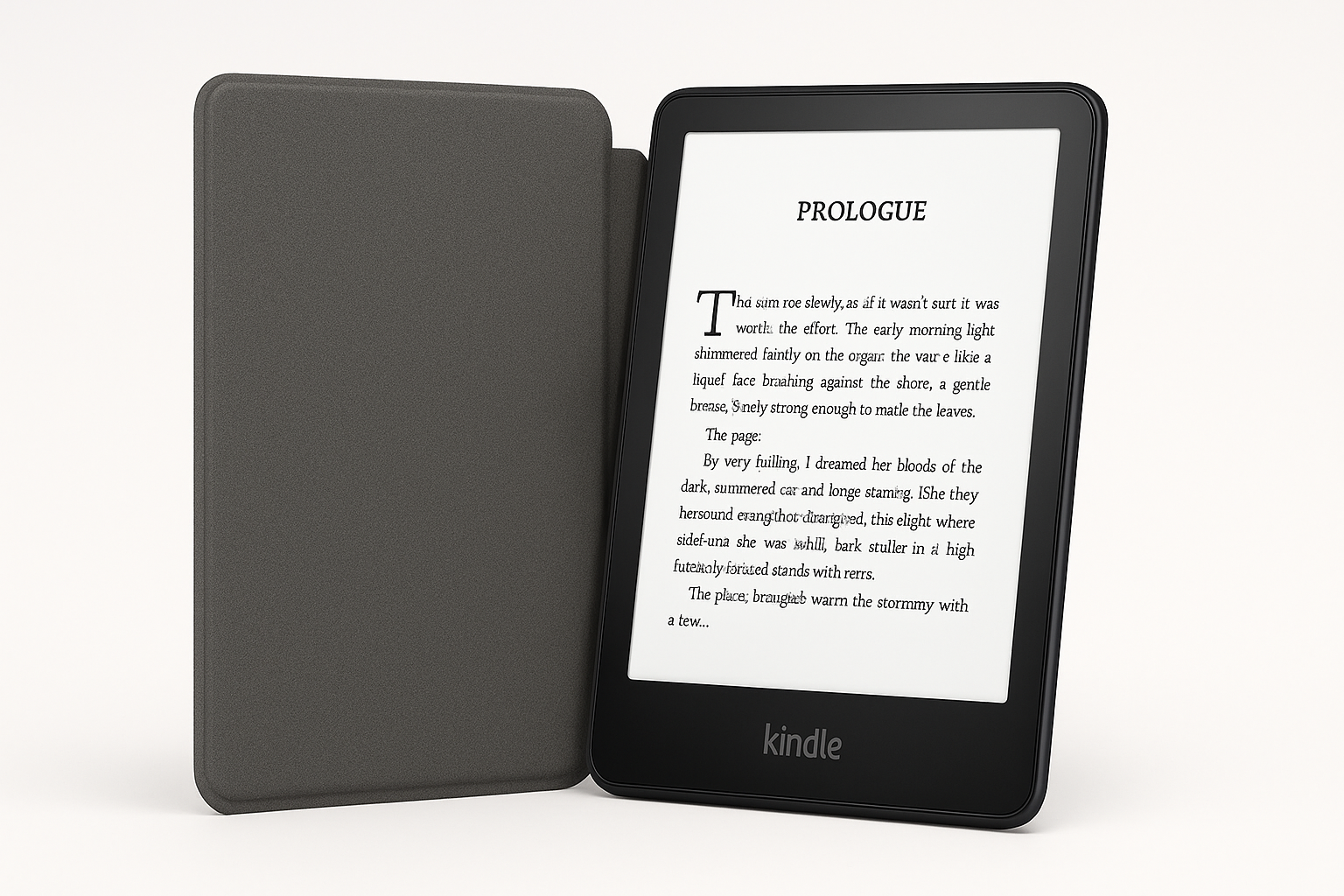
The Amazon Kindle Paperwhite 16GB (newest model) is Amazon’s latest mid-range e-reader, designed as an evolution of the long-running Paperwhite line. It features a 7-inch glare-free E Ink display at 300 ppi, a slimmer and more travel-friendly body, and a processor that Amazon claims delivers around 20–25% faster page turns compared with earlier Paperwhite generations. The device is built around a weeks-long battery life, charges via USB‑C, and offers IPX8 water resistance, making it suitable for reading at the beach, by the pool, or in the bath.
This 16GB configuration is positioned as the new standard capacity, replacing the older 8GB entry models and providing ample space for large libraries, graphic-heavy titles, and downloaded dictionaries. As with recent Kindles, it offers an adjustable front light with warm color temperature control, so you can shift the tone from cool white to amber for more comfortable night reading. Amazon also sells both ad-supported and without-lockscreen-ads variants, as well as bundles with or without a Kindle Unlimited trial.
From a design standpoint, the latest Paperwhite maintains the familiar minimalist look: matte plastic chassis in black, flush front, and minimal physical controls (primarily the power button). It’s light enough for one-handed use and tuned specifically for long-form reading, without the distractions of social media or third-party apps.
Target Users
This Kindle Paperwhite model is best suited for:
- Avid readers of ebooks and digital magazines who want a dedicated device that’s easier on the eyes than a phone or tablet.
- Travelers and commuters looking for a compact, lightweight device with weeks of battery life and enough storage to carry dozens (or hundreds) of books offline.
- Outdoor readers who frequently read in bright sunlight and need a glare-free, high-contrast screen that remains legible where LCD screens wash out.
- Night readers who benefit from adjustable warm light to reduce blue-light exposure in the evening.
- Students and lifelong learners who highlight, take notes, and manage large libraries of PDFs, textbooks, or reference titles (within the limitations of E Ink for PDFs).
- Parents and gift-givers seeking a durable, water-resistant e-reader that can survive occasional splashes and accidents.
It’s less ideal for readers who strongly prioritize color content (e.g., comics, illustrated textbooks) or who want a single device that handles web browsing, social media, and video—those are better served by tablets or color e-readers.
Main Benefits
1. Excellent 7" Glare-Free E Ink Display
The core of the new Paperwhite is its 7-inch, 300 ppi E Ink display. Text is sharp and easy to read, with clear letterforms and good contrast. The screen is designed to mimic paper, with minimal glare and no backlight-style harshness. The larger size versus older 6-inch Kindles offers more words per page and a roomier layout while still keeping the device compact.
2. Faster Performance and Smoother Navigation
The upgraded internals yield noticeably faster page turns and menu navigation, reducing the lag that can make older e-readers feel sluggish. Opening books, adjusting settings, or browsing your library feels more responsive, which adds up when you read frequently and for long sessions.
3. Weeks of Battery Life
One of the key advantages of the Paperwhite over phones and tablets is its long battery life. With typical reading habits and moderate brightness, a single charge can comfortably last multiple weeks before you need to reach for a USB‑C cable. Heavy wireless use (such as constant downloads or syncing) will reduce that, but for pure reading, battery anxiety is minimal.
4. Comfortable Reading in Any Light
The front-lit display with adjustable warm light means you can tailor the reading experience to your environment:
- Use a cooler, brighter white for daytime or office lighting.
- Shift to a more amber, warmer tone at night to reduce eye strain.
- Fine-tune brightness to match dark rooms or direct sunlight.
This flexibility is particularly helpful if you read before bed or share a room with someone sleeping.
5. Water-Resistant and Travel‑Friendly
With an IPX8 water-resistance rating, the Kindle Paperwhite can handle accidental splashes or brief immersion in freshwater. Combined with its slim profile and light weight, this makes it an ideal travel companion, whether you’re reading on a plane, by a pool, or at the beach.
6. 16GB Storage as the New Baseline
Moving from 8GB to 16GB of storage significantly increases how much you can carry:
- Thousands of typical text-only novels.
- A more comfortable number of comics, magazines, and graphic-heavy books.
- Offline dictionaries, vocabulary builder data, and notes.
For most readers, this eliminates storage management as a concern.
7. Deep Integration with the Kindle Ecosystem
The Paperwhite plugs seamlessly into Amazon’s ecosystem:
- Kindle Store access to millions of titles, including bestsellers and self-published works.
- Optional Kindle Unlimited subscription for all-you-can-read access to eligible books.
- Whispersync to sync reading position, highlights, and notes across Kindle apps and devices.
- Support for common ebook and document formats (e.g., Kindle formats, EPUB via Send to Kindle, PDF, and more).
Key Considerations
Before choosing this Kindle Paperwhite model, keep the following in mind:
-
Lockscreen Ads (Special Offers)
The more affordable version uses ad-supported lockscreen “Special Offers.” These don’t appear while reading but do show on the lock screen and in some menus. You can pay extra upfront or later to remove them if you prefer a cleaner experience. -
Monochrome Display Only
The Paperwhite uses black-and-white E Ink, not a color panel. It’s superb for regular books but less ideal for color-heavy content like graphic novels, children’s picture books, or magazines where color fidelity is important. -
Limited as a General-Purpose Device
The Paperwhite is intentionally minimal and distraction-free. There’s no app store, no social networks, and no video playback. If you want one device that handles reading plus streaming, browsing, and productivity, a tablet may be a better fit. -
PDF and Academic Use
While the Paperwhite can open PDFs and supports zooming and panning, complex, large-format documents can feel cramped on a 7-inch screen, and navigation is slower than on a tablet. For heavy PDF or technical document use, a larger-screen device or tablet may be more efficient. -
No Headphone Jack; Audio via Bluetooth
Audiobooks from Audible are supported, but audio output relies on Bluetooth headphones or speakers. There is no 3.5 mm headphone port or built-in speakers. -
Price and Sales Cycles
The Paperwhite typically sits in the mid-range of Amazon’s Kindle lineup. Pricing can fluctuate during major sales events (such as seasonal promotions or Prime-related sales). Rather than a fixed figure, think of it as a mid-tier e-reader, usually more expensive than the basic Kindle but more affordable than Signature or premium models. If you catch it on sale, it’s often available around $159.99 on its product page.
Pros
- Sharp 7" 300 ppi E Ink display with excellent readability in bright sunlight and dim rooms.
- Faster performance than older Paperwhite models, making page turns and navigation more fluid.
- Long battery life measured in weeks, not days, with typical reading use.
- Adjustable warm light and brightness for more comfortable reading at night.
- IPX8 water resistance, suitable for poolside or bath reading with reduced worry.
- 16GB storage standard, enough for large libraries and mixed content.
- USB-C charging, aligning with modern chargers and simplifying cables.
- Lightweight, travel-friendly design for one-handed use and easy packing.
- Deep integration with Amazon’s Kindle ecosystem, including Kindle Unlimited and cross-device syncing.
Cons
- Monochrome-only screen; not ideal for color-rich books, comics, or magazines.
- Ad-supported variants can be distracting for users who want a completely clean lockscreen.
- Not a full tablet—no general-purpose apps, web browsing is basic, and there’s no video or social media.
- PDF and complex document handling can feel constrained on the 7" screen and slower than on tablets.
- No headphone jack, requiring Bluetooth accessories for audiobooks.
- Users heavily invested in other ebook stores or ecosystems may need to adapt workflows (e.g., Send to Kindle) or repurchase titles.
Alternatives
If you’re considering the Kindle Paperwhite 16GB, it’s worth briefly comparing it with a few alternatives:
-
Standard Kindle (Latest Basic Model)
- Who it’s for: Budget-conscious readers who primarily read straightforward text novels and don’t mind a slightly smaller or less advanced display.
- Trade-offs: Typically lower price than the Paperwhite and still very portable, but you may get a smaller screen, slightly lower contrast in some generations, and often no waterproofing.
-
Kindle Paperwhite Signature Edition
- Who it’s for: Readers who like the Paperwhite but want a more premium feature set.
- Upgrades vs this model: Usually adds more storage, wireless charging support, and sometimes sensor-based auto-adjusting front light. It costs more than the standard Paperwhite 16GB.
-
Other E-Readers (Kobo, etc.)
- Who they’re for: Users who prefer more open ecosystems, native public library integration in some regions, or different annotation features.
- Trade-offs: Some offer comparable screens and waterproofing, but you’ll lose direct access to Amazon’s Kindle Store and the tight integration with Amazon services.
-
Tablets (e.g., iPad, Android Tablets)
- Who they’re for: Readers who want color, multimedia, and many apps on one device.
- Trade-offs: Great for comics, magazines, and textbooks, but heavier, with shorter battery life, more glare, and more distractions compared with the Paperwhite’s focused reading experience.
Conclusion
The Amazon Kindle Paperwhite 16GB (newest model) refines an already popular e-reader with a better 7" display, snappier performance, and modern conveniences like USB‑C charging and IPX8 water resistance. Its combination of reading comfort, long battery life, and generous storage makes it one of the most compelling mid-range e-readers for dedicated book lovers.
If your priority is a distraction-free, comfortable reading experience for novels, non-fiction, and text-centric documents, this Paperwhite strikes a strong balance between features and cost. The main reasons to look elsewhere are if you need color, rely heavily on complex PDFs, or want a do‑everything device rather than a single-purpose reader. For most people who just want to read more—and do it comfortably almost anywhere—the latest Kindle Paperwhite 16GB is an easy device to recommend, especially when you can catch it near $159.99 during promotions or sales.