
Apple 2026 MacBook Air 13-inch (M5) Review: A Lean, AI-Ready Ultraportable for Everyday Power Users
What This Product Is
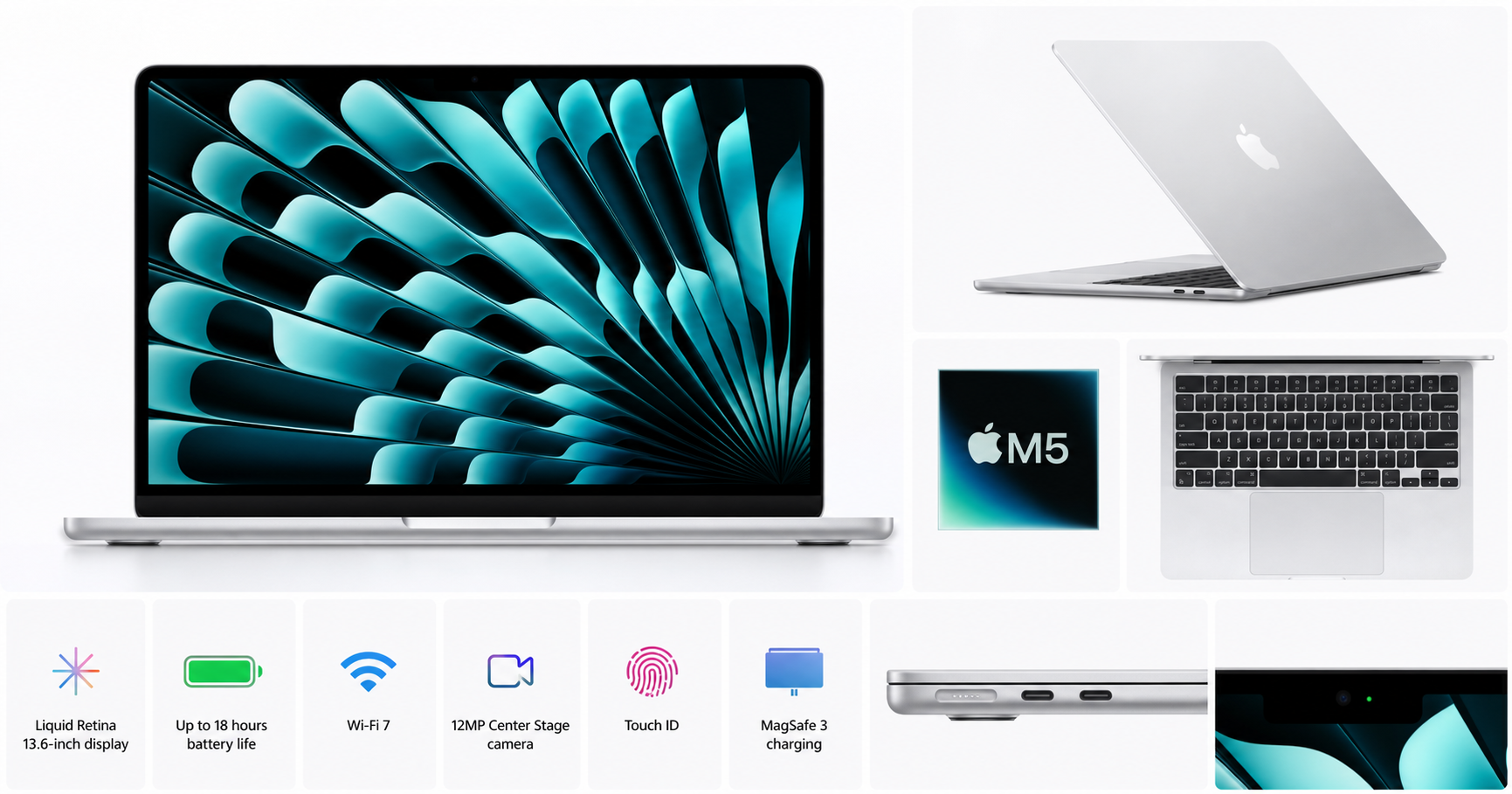
The Apple 2026 MacBook Air 13‑inch Laptop with M5 chip is Apple’s latest iteration of its ultra‑portable notebook line. The specific configuration covered here includes:
- 13.6‑inch Liquid Retina display (2560 × 1664)
- Apple M5 chip (10‑core CPU, 8‑core GPU, 16‑core Neural Engine, depending on configuration)(support.apple.com)
- 16GB unified memory
- 512GB SSD storage (base capacity for the 2026 generation)(support.apple.com)
- 12MP front camera with Center Stage
- Touch ID in the keyboard
- Wi‑Fi 7 and Bluetooth 6 for next‑gen wireless connectivity(apple.com)
- Fanless, thin‑and‑light aluminum chassis in Silver
While the MacBook Air has traditionally targeted everyday productivity, the M5 generation leans further into on‑device AI workloads, boosted graphics, and a more capable media engine, all while preserving the familiar Air design and long battery life.
If you’re buying it on Amazon at around $899.99, you’re looking at Apple’s mainstream, do‑almost‑everything portable Mac for 2026.
Why It Matters
The 2026 MacBook Air 13‑inch with M5 matters for a few key reasons:
- M5 brings AI and performance up a notch – Compared with earlier M‑series Airs, M5 adds more powerful CPU and GPU cores, a faster Neural Engine, and hardware‑accelerated ray tracing, which directly benefits tasks like code completion, language models, transcription, photo enhancement, and other on‑device AI workflows.(support.apple.com)
- Base storage is finally 512GB – Apple has doubled the default SSD capacity from 256GB to 512GB on the M5 MacBook Air, easing a common pain point for users who juggle large photo libraries, offline media, and professional apps.(apple.com)
- Wi‑Fi 7 future‑proofs connectivity – With Wi‑Fi 7 and updated Bluetooth, the Air can better handle high‑bandwidth use cases like cloud backups, large project syncs, and low‑latency screen sharing as compatible routers become more common.(apple.com)
- The Air remains Apple’s default laptop for most people – For many students, home users, and mobile workers, the 13‑inch Air is the entry point to macOS and Apple silicon. The M5 model improves performance and longevity without adding bulk or complexity.
In short, this configuration aims to be the balanced sweet spot for users who want a light laptop that can comfortably handle multi‑app workflows and moderate creative or AI tasks, without stepping up to the cost and weight of a MacBook Pro.
Key Advantages
1. Strong Performance in a Fanless Design
The MacBook Air’s defining trait remains: it’s fast, silent, and cool for most everyday workloads.
- The M5 chip offers a 10‑core CPU and 8‑core GPU in this typical 13‑inch Air configuration, giving noticeable gains in multi‑core performance and integrated graphics versus previous Air generations.(support.apple.com)
- Thanks to Apple silicon efficiency, the Air sustains impressive speeds in common tasks—office work, web browsing with many tabs, video calls, note‑taking, and light photo/video edits—without a fan ramping up.
- The upgraded Neural Engine and media engine make short work of video encoding, HEVC/ProRes playback, and AI‑assisted edits.
If you frequently work in IDEs, run several productivity apps, and keep Slack, Teams, or multiple browsers open, 16GB unified memory and the M5’s bandwidth (over 150 GB/s) provide a responsive experience with fewer slowdowns.(support.apple.com)
2. 13.6‑inch Liquid Retina Display
The Air keeps the 13.6‑inch Liquid Retina panel introduced in the M2 generation:
- 2560 × 1664 resolution at 224 ppi
- 500 nits brightness
- Wide color (P3) and True Tone for consistent color and reduced eye strain(support.apple.com)
While it doesn’t offer the 120 Hz ProMotion or mini‑LED/OLED contrast of higher‑end Macs, it’s still a sharp, bright, color‑accurate screen that’s more than sufficient for productivity, photo editing, and content consumption.
3. Much More Reasonable Base Storage
The included 512GB SSD is a practical baseline:
- Enough space for macOS, key applications, a sizeable documents library, and media files before you have to aggressively offload to external drives or cloud storage.
- Faster internal storage still outpaces most external solutions for day‑to‑day work.
If needed, Apple also offers higher‑capacity SSD options (up to 4TB), but for many users this 512GB build is the best value starting point.
4. Long Battery Life
Apple rates the 13‑inch M5 MacBook Air for up to 18 hours of video playback and around 15 hours of wireless web browsing, similar to or slightly better than the previous generation.(support.apple.com) In realistic mixed use—web, office apps, video calls, streaming, light coding—you can expect a full workday away from an outlet.
The included 40W Dynamic Power Adapter and MagSafe 3 charging port make it easy to top up quickly, and the machine supports faster charging with a higher‑wattage USB‑C adapter if you already own one.(support.apple.com)
5. Modern Connectivity and Camera
This model updates its wireless hardware and webcams to better fit the era of remote work:
- Wi‑Fi 7 and Bluetooth 6 improve connection stability and throughput for high‑density environments and compatible peripherals.(apple.com)
- 12MP Center Stage camera offers sharper video and automatic framing, moving you more centrally in the picture during calls.
- Dual Thunderbolt 4 / USB 4 ports support fast external drives, docks, and up to one external high‑resolution display.(support.apple.com)
For hybrid workers and students, these changes make the Air feel more future‑ready.
Key Limitations
1. Still Limited External Display Options
Like earlier Apple silicon Airs, the 13‑inch M5 MacBook Air typically supports only one external display (plus the built‑in panel) at up to 6K resolution, depending on configuration.(support.apple.com)
If you rely on two or more external monitors for productivity or creative work, you may need a MacBook Pro or a separate desktop solution. There are workarounds using DisplayLink docks, but they add cost and complexity.
2. No Pro-Level Features (120 Hz, mini‑LED/OLED, More Ports)
To keep the Air thin and light, Apple continues to hold back some features for the Pro line:
- The display remains 60 Hz, with no ProMotion high refresh rate.
- It uses standard LED‑backlit IPS instead of mini‑LED or OLED.
- You still get only two Thunderbolt 4 ports and a headphone jack—no HDMI, SD card slot, or extra USB‑A without a hub.(support.apple.com)
For many everyday users, this is acceptable. But if you’ve grown used to 120 Hz panels, built‑in HDMI, or SD readers on other laptops, you may find the Air’s feature set restrictive.
3. Non‑Upgradeable Memory and Storage
As with all modern MacBooks, memory and storage are soldered to the motherboard. Once you choose 16GB unified memory and 512GB SSD, you cannot upgrade later.
This isn’t new, but it means you should think carefully about your long‑term needs. Heavy multitaskers or professionals may prefer 24GB or 32GB of RAM and 1TB or more of storage, which requires moving up the configuration at purchase time.
4. Integrated Graphics Still Have Limits
The 8‑core GPU in the M5 chip is capable for integrated graphics: it can handle light gaming, 4K video editing, and GPU‑accelerated tasks better than past Airs.(support.apple.com) But if you:
- Frequently render complex 3D scenes
- Edit multiple streams of high‑bit‑rate 4K/8K video
- Rely on heavy GPU‑accelerated AI workloads or large model training
…the Air will feel constrained versus machines with higher‑tier GPUs (such as M5 Pro/Max in MacBook Pro or dedicated GPUs on some Windows laptops).
Who It’s For
This specific Silver 13‑inch MacBook Air M5 with 16GB RAM and 512GB SSD is best suited to:
1. Students and Knowledge Workers
If your daily tasks revolve around:
- Web research and writing
- Office apps (word processors, spreadsheets, presentations)
- Classroom or meeting note‑taking
- Email, messaging, and cloud‑based tools
…the M5 Air is an excellent fit. Long battery life, light weight, and a comfortable keyboard make it ideal for lectures, co‑working spaces, and frequent commuting.
2. Mobile Creators and Light Media Editors
Photographers, bloggers, and content creators who primarily handle light to moderate workloads will appreciate:
- The color‑accurate display for photo culling and basic grading.
- The faster media engine for transcoding and playback.
- Enough CPU/GPU power to comfortably manage Lightroom catalogs, Figma, or short-form video edits.
For more demanding projects, you might eventually run into the limits of 16GB RAM and integrated graphics, but for many solo creators and social content workflows, this configuration is a sweet spot.
3. Developers and Technical Users With Moderate Needs
For many software engineers, data analysts, and technical professionals, the Air offers:
- Fast compilation times for small to medium projects.
- Enough memory for common dev stacks, Docker containers, and local tools.
- Strong single‑core performance and a capable Neural Engine for AI‑assisted coding tools.
If you work regularly with large datasets, heavy containerization, or GPU‑intensive ML models, you may want more memory and a Pro‑class chip, but the Air is more than sufficient for typical web and app development.
4. Users Upgrading From Much Older Macs or Basic Windows Laptops
Anyone coming from an Intel‑based Mac from 2019 or earlier, or from an entry‑level Windows ultrabook, will see a dramatic jump in:
- Responsiveness
- Battery life
- Thermal behavior (silent, cool operation)
For these users, the M5 Air is a clear quality‑of‑life upgrade that should comfortably last several years as a primary machine.
Who Should Skip It
You may want to skip this configuration and consider a different Mac or PC if:
1. You Need Multiple External Monitors
If your productivity hinges on two or more external displays, the single‑external‑monitor limitation will be frustrating. In that case, a MacBook Pro or a desktop Mac/PC with more flexible display output makes more sense.
2. You Work in High‑End Video, 3D, or Heavy ML
Professional creators who routinely handle:
- Long, multi‑stream 4K/8K video timelines
- Cinema‑grade color workflows
- Complex 3D rendering
- Large‑scale machine learning experiments
will likely outgrow the Air quickly. For those users, higher RAM capacities, more powerful GPUs, and improved cooling on a MacBook Pro—or a workstation PC—are better investments.
3. You Want a Pro Display and More Ports Built In
If you specifically want:
- 120 Hz ProMotion and HDR mini‑LED/OLED
- Built‑in HDMI, SD card slots, and more Thunderbolt ports
then the Air’s compromises will be noticeable day‑to‑day. Again, the MacBook Pro line directly targets that use case.
4. You’re on a Tight Budget and Don’t Need M5
Because the 2026 Air is a current‑generation model, it usually costs more than older Airs. If your workload is undemanding—basic browsing, email, and streaming—a discounted previous‑generation MacBook Air (M3 or M4) may offer better value than paying around $899.99 for the latest M5 model.
Final Recommendation
The Apple 2026 MacBook Air 13‑inch with M5, 16GB unified memory, and 512GB SSD is an excellent all‑rounder ultraportable for 2026. It blends:
- Strong M5‑class performance in a silent, fanless chassis
- A sharp 13.6‑inch Liquid Retina display
- Practical 512GB base storage and 16GB RAM
- Long battery life
- Modern Wi‑Fi 7 connectivity and a significantly better webcam
For students, everyday professionals, and many independent creators, this configuration hits a near‑ideal balance of performance, portability, and longevity. If your budget supports a purchase around $899.99 and you don’t require multiple monitors or Pro‑tier features, it’s one of the most compelling thin‑and‑light laptops you can buy right now.
On the other hand, if you:
- Need a multi‑monitor workstation
- Rely on very heavy video, 3D, or ML workloads
- Strongly prefer 120 Hz displays and extra ports
then you should look at the MacBook Pro or other higher‑end systems instead.
For most people who want a modern, AI‑capable, and highly portable Mac that will stay relevant for years, this 13‑inch M5 MacBook Air in Silver is easy to recommend.