
Apple 2026 MacBook Air 15‑inch (M5, 16GB/512GB) Review: An Ultra‑Portable Mac Tuned for AI Workflows
Product Context
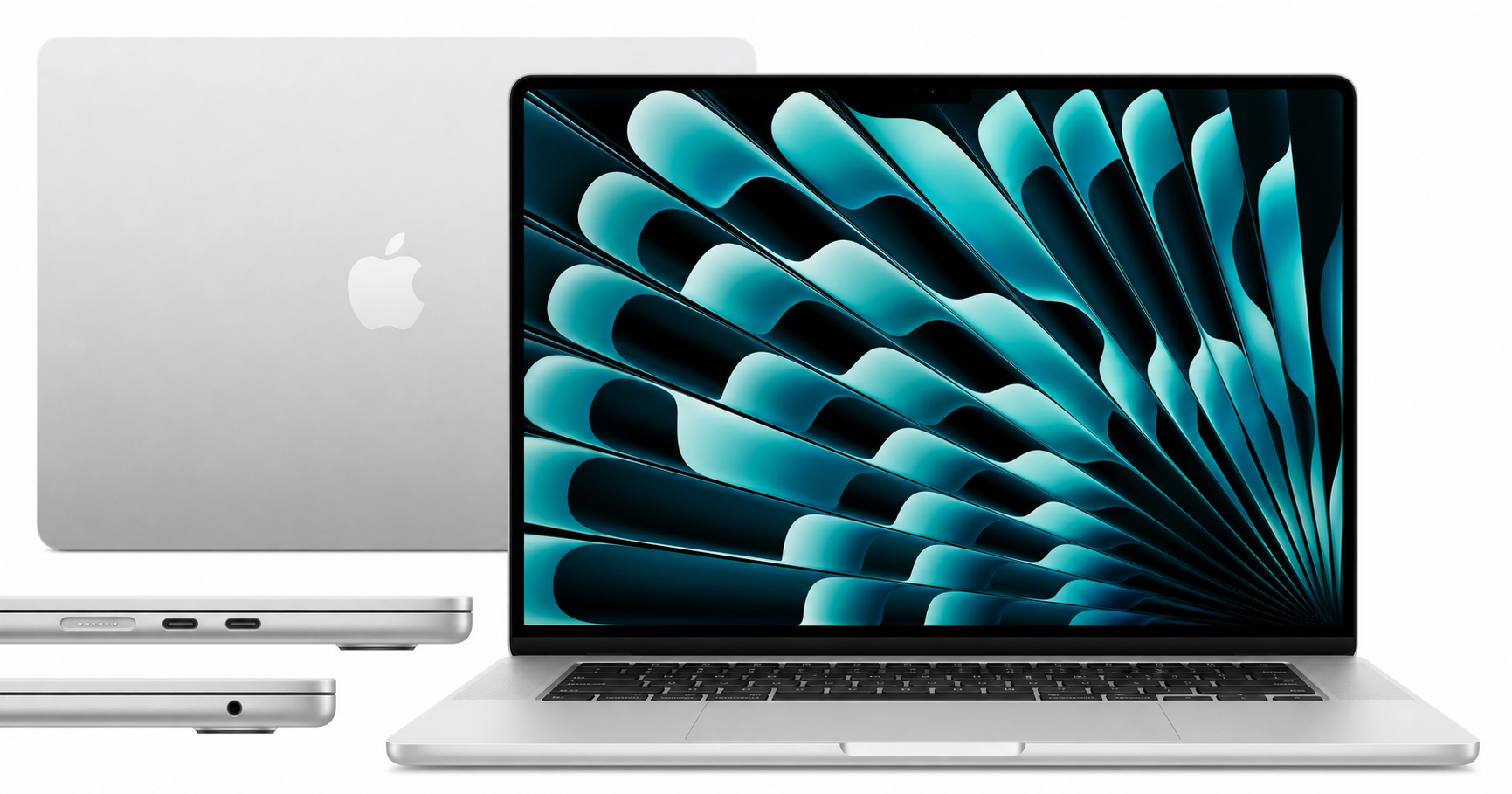
The Apple 2026 MacBook Air 15‑inch Laptop with M5 chip is Apple’s larger, ultra‑portable notebook aimed at users who want more screen space than the 13‑inch Air without stepping up to the thicker, heavier MacBook Pro line.
Key traits of this configuration include:
- 15.3‑inch Liquid Retina display
- Apple M5 chip
- 16GB unified memory
- 512GB SSD
- 12MP front camera with Center Stage
- Touch ID
- Wi‑Fi 7 and Bluetooth 6
- Silver finish
Compared to earlier MacBook Air generations, this 2026 model focuses heavily on AI‑assisted workflows. The M5’s updated Neural Engine and GPU "Neural Accelerators" are designed to run on‑device AI features in macOS and Apple’s own Apple Intelligence tooling while staying within the efficiency envelope that defines the Air line.
From a value perspective, it generally sits at the premium end of mainstream laptops. If you find it around $1149.00 on Amazon, you’re paying for a blend of build quality, battery life, and Apple’s ecosystem integration rather than the very highest raw compute performance per dollar.
Feature Breakdown
Design and Build
- Chassis and materials: The 15‑inch MacBook Air follows Apple’s unibody aluminum design language. At roughly 0.45 inches thick and about 3.3 pounds, it’s notably thin and light for a 15‑inch machine, making it easy to carry in a backpack or messenger bag.
- Portability: Despite the larger screen, the footprint remains compact thanks to slim bezels. This is one of the more travel‑friendly 15‑inch laptops available.
- Color: This specific model is in Silver, the classic Mac finish that tends to hide fingerprints better than darker colors.
Display
- Size and resolution: The 15.3‑inch Liquid Retina panel offers high pixel density with sharp text and detailed images, making it comfortable for split‑screen multitasking and creative apps.
- Color and brightness: Wide color gamut support and strong brightness make it well‑suited for photo editing, content consumption, and general productivity, even in brighter environments.
- Aspect ratio: Apple’s taller screen ratio gives you more vertical space than many 16:9 Windows laptops, which helps with documents, code, and timelines.
Processor and AI Capabilities
- Apple M5 chip: Positioned as the next‑generation efficiency chip, the M5 delivers a bump in CPU and GPU performance over previous Air models while maintaining a fanless, quiet design.
- Neural Engine and Neural Accelerators: These blocks are tuned for on‑device AI, accelerating tasks like:
- Transcription and language tools
- Image enhancement and background removal
- Generative and assistive features built into macOS and Apple’s productivity apps
- Apple Intelligence integration: The laptop is marketed as "Built for AI," meaning many new macOS features that rely on local models and privacy‑preserving computation are designed to run directly on this hardware rather than in the cloud.
Memory and Storage
- 16GB unified memory: The single pool of memory shared by CPU and GPU improves efficiency. 16GB is a practical sweet spot for:
- Developers with multiple tools and browser tabs open
- Creators working with moderate‑resolution photo and video projects
- Power users who keep many apps running concurrently
- 512GB SSD: Adequate for system files, productivity workflows, and a reasonable library of apps and media. Users with large RAW photo libraries or many 4K video projects may eventually want external storage or a higher‑capacity configuration.
Connectivity and Ports
- Wi‑Fi 7 & Bluetooth 6: Ready for next‑generation wireless networks, offering higher throughput and lower latency when paired with compatible routers and accessories.
- Ports:
- 2 × Thunderbolt 4 (USB‑C) ports for charging, data, and displays
- 1 × MagSafe charging port (helpful for freeing both Thunderbolt ports for peripherals)
- 3.5mm headphone jack
- External displays: Support for up to two external monitors gives you room to build a multi‑display workspace from a compact laptop.
Camera, Audio, and Input
- 12MP Center Stage camera: Higher‑resolution webcam with automatic framing, making video calls look sharper and more professional.
- Audio: Six‑speaker system with Spatial Audio and Dolby Atmos support offers more depth and clarity than earlier Air models and many thin‑and‑light competitors.
- Keyboard and trackpad:
- Backlit keyboard suitable for low‑light environments
- Large glass trackpad with precise tracking and gesture support
- Touch ID: Integrated fingerprint reader for quick unlock and secure authentication in apps and Safari.
Performance Insights
Everyday Productivity
For typical daily workloads—web browsing, office apps, note‑taking, communication, and light photo management—the M5‑equipped MacBook Air feels highly responsive. App launches are quick, multitasking is smooth, and the system remains silent under most light‑to‑moderate loads thanks to the fanless design.
Creative and Professional Workflows
- Photo editing: The combination of the Liquid Retina display, 16GB unified memory, and M5 GPU is well‑suited for Lightroom‑style editing, batch processing, and moderate‑sized RAW catalogs.
- Video editing: The machine can handle timeline editing and exports for short‑form content and 1080p/4K projects, especially when codecs are optimized for Apple Silicon. Extremely heavy, multi‑stream 4K or 8K workflows are still better suited to MacBook Pro models.
- AI‑enhanced tasks: Effects such as noise reduction, smart selections, and generative fill that leverage the Neural Engine should run faster and more efficiently than on older Intel‑based Macs or earlier Apple Silicon designs that lacked the same AI focus.
Battery Life and Thermals
- Battery life: Apple rates the 15‑inch MacBook Air line for up to around a full workday of use, and the M5’s efficiency—combined with the absence of power‑hungry discrete graphics—supports that expectation in typical productivity scenarios.
- Thermals and noise: The fanless chassis means operations remain silent. Under sustained heavy CPU/GPU loads, you may see performance throttle to keep temperatures in check, which is an expected design trade‑off in thin‑and‑light machines.
Comparison to Other Apple Laptops
- Versus smaller MacBook Air: This 15‑inch version mainly adds screen real estate and a slightly different thermal envelope; performance is similar given the same chip generation. The larger display is the main reason to choose it.
- Versus MacBook Pro: The Air prioritizes portability, battery life, and silent operation over prolonged peak performance. Power users with heavier video, 3D, or development workloads may still favor a Pro, especially for its active cooling and higher‑end GPU options.
Usability
Day‑to‑Day Experience
- Setup and ecosystem: macOS setup is straightforward, and users in the Apple ecosystem benefit from:
- iPhone Mirroring
- Universal Clipboard
- AirDrop and iCloud Drive
- Handoff between iPhone, iPad, Apple Watch, and Mac
- Port selection: Two Thunderbolt ports are enough for many users, but heavy desk setups may want a USB‑C hub or dock for additional peripherals, wired Ethernet, or additional display connectivity.
Mobility
- Weight and size: At roughly 3.3 pounds and a slim profile, this is an easy laptop to carry between home, office, and campus. The 15.3‑inch display means you often won’t need to bring a portable monitor.
- Durability: The aluminum chassis feels solid, though—as with most thin notebooks—using a protective sleeve in a bag is recommended.
Accessibility and Convenience
- Touch ID streamlines logins and password autofill.
- Backlit keyboard improves usability in dim lecture halls or on flights.
- High‑quality webcam and microphones simplify remote work and classes without requiring external accessories.
Trade‑offs
While the 2026 MacBook Air 15‑inch with M5 is a strong all‑rounder, it isn’t perfect for every scenario.
Where It Excels
- Users who prioritize portability plus a larger screen
- Students and knowledge workers who need long battery life and low noise
- Creators working with moderate photo/video workloads who value Apple’s software stack
- Anyone invested in the Apple ecosystem and interested in on‑device AI features
Limitations to Consider
- Not a dedicated gaming machine: Integrated graphics and macOS’s more limited native game library mean this isn’t ideal for serious PC gaming.
- No user‑upgradable RAM or storage: Memory and SSD are soldered; choose your configuration carefully at purchase time.
- Sustained heavy workloads: For long rendering sessions, high‑end coding projects with large builds, or intensive 3D work, the thermally‑throttled, fanless design will trail behind actively cooled MacBook Pro models.
- Port count: Two Thunderbolt ports are flexible but minimal; many desk setups will need a dock.
Price Positioning
The MacBook Air line is rarely the budget choice. The 15‑inch M5 model typically sits at a premium mainstream price tier. Seeing it around $1149.00 on Amazon reflects the cost of a high‑quality 15‑inch display, M‑series performance, and the broader Apple experience rather than component specs alone.
Conclusion
The Apple 2026 MacBook Air 15‑inch (M5, 16GB, 512GB) is a compelling option for users who want a bigger canvas than the 13‑inch Air without sacrificing portability. Its combination of a 15.3‑inch Liquid Retina display, efficient M5 chip, solid unified memory capacity, and forward‑looking Wi‑Fi 7 connectivity makes it particularly well suited to students, mobile professionals, and creators who lean into Apple’s AI‑enhanced software ecosystem.
If your work revolves around office apps, web tools, creative projects up to medium complexity, and frequent video calls—and you prefer a silent, lightweight machine—the trade‑offs are largely positive. Power users with extremely heavy workloads or those seeking maximum game compatibility might be better served by a MacBook Pro or a dedicated gaming laptop, but for most everyday and professional tasks, this 15‑inch MacBook Air offers a refined, future‑leaning balance of performance, portability, and battery life.