
Apple iPad 11‑inch (A16, 128GB, Wi‑Fi) Review: The New Mainstream iPad Sweet Spot
What This Product Is
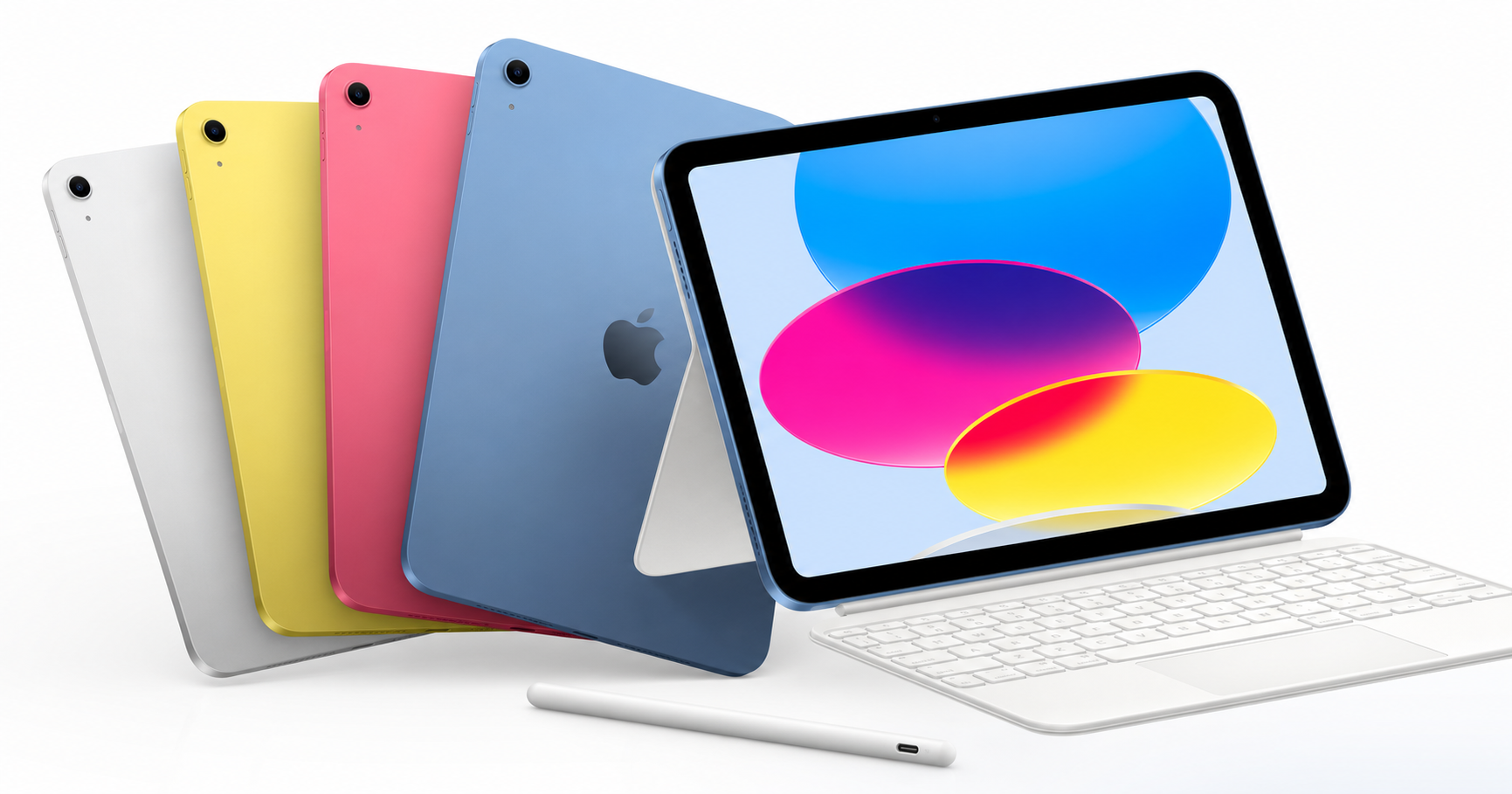
The Apple iPad 11‑inch (A16, 128GB, Wi‑Fi, Blue) is Apple’s current mid‑tier tablet in the 11‑inch size class. It sits between the entry‑level 10.9‑inch iPad and the higher‑priced iPad Air and iPad Pro models.
This model features:
- A16 Bionic chip: The same generation chip used in recent iPhones, offering a big step up from older A13/A14‑based iPads.
- 11‑inch Liquid Retina display: A sharp, bright LCD panel with True Tone and wide color support, ideal for streaming, browsing, and note‑taking.
- 128GB of storage (base configuration): Enough for typical app use, offline media, and documents, with options to go up to 512GB if you buy a different configuration.
- Wi‑Fi 6 connectivity: Faster wireless speeds and better performance on busy networks compared with Wi‑Fi 5 models.
- 12MP front camera with Center Stage: Landscape‑oriented front camera that tracks you during video calls.
- 12MP rear camera with True Tone flash: Suitable for scanning documents and casual photography, with support for up to 4K video.
- Touch ID in the top button: Fingerprint sensor for unlocking, App Store purchases, and Apple Pay.
- USB‑C port: For charging, accessories, and external storage.
- All‑day battery life: Up to around 10 hours of typical use, depending on workload.
The 128GB Wi‑Fi configuration in Blue sold via Amazon typically sits around $399.00, with some variance over time, positioning it clearly as a mid‑range iPad in Apple’s lineup rather than a budget or pro device.
Why It Matters
The 11‑inch A16 iPad matters because it reshapes the default iPad choice for most people:
- It brings modern performance and cameras to a more affordable tier than the iPad Air and Pro.
- The 11‑inch size is a sweet spot: meaningfully larger than older 9.7‑inch and 10.2‑inch iPads for multitasking and reading, but still highly portable.
- The inclusion of USB‑C and Wi‑Fi 6 helps future‑proof the device for several years of accessory and network compatibility.
- By pairing with Apple Pencil (USB‑C) and Magic Keyboard Folio, it can double as a serious note‑taking and light productivity machine without forcing you into Pro‑level pricing.
For schools, families, and professionals who don’t need ProMotion or M‑series chips, this model offers a more accessible entry into the current-generation iPad ecosystem.
Key Advantages
1. Strong A16 Performance for Daily Use and Light Creation
The A16 chip is significantly faster than the processors in older mainstream iPads. In practice, this means:
- Snappy everyday performance for web browsing, social media, messaging, and multitasking.
- Smooth performance in most productivity apps (Microsoft 365, Google Workspace, Apple iWork, Notability, GoodNotes, etc.).
- Enough headroom for casual to moderate gaming and light creative work like photo editing, sketching, or simple video edits.
You’re not getting the extreme headroom of an M‑series iPad Pro, but for the target audience, the A16 offers more than enough performance with several years of OS updates likely ahead.
2. Versatile 11‑inch Liquid Retina Display
The 11‑inch Liquid Retina display offers:
- A sharp resolution that keeps text crisp and images detailed.
- True Tone for comfortable viewing in different lighting environments.
- Sufficient brightness for indoor use and occasional outdoor work.
While it lacks ProMotion’s 120Hz refresh rate, the panel feels responsive for note‑taking and Apple Pencil usage. For streaming video, reading, and productivity, it’s more than adequate.
3. Much‑Improved Camera Placement and Quality
The 12MP front camera is designed for landscape orientation and supports Center Stage, which automatically pans and zooms to keep you in frame on calls. This makes a big difference for:
- Remote classes and meetings
- Family video calls
- Recording quick video messages
The 12MP rear camera with True Tone flash is overkill for basic document scanning, which is great news if you rely on the iPad for scanning receipts, worksheets, or whiteboards. It also captures decent casual photos and 4K video when you don’t have your phone handy.
4. Accessories Support (Apple Pencil and Magic Keyboard Folio)
This iPad supports Apple Pencil (USB‑C) and compatible keyboard folios (such as the Magic Keyboard Folio for this generation). Combined, these unlock several workflows:
- Handwritten notes, diagrams, and markups for students and professionals.
- On‑the‑go typing for email, documents, and reports.
- A laptop‑like experience when needed, without committing to a MacBook.
The modular approach—using it as a tablet most of the time and attaching peripherals only when required—keeps the setup flexible and travel‑friendly.
5. Balanced Feature Set for the Price Tier
At around $399.00 for the 128GB Wi‑Fi model (pricing will vary by region and promotions), the device delivers:
- Modern performance
- A large, high‑quality display
- Strong cameras for video calls and scanning
- USB‑C and Wi‑Fi 6
For many buyers, this combination is more compelling than spending extra on an iPad Air/Pro or settling for a smaller or older entry‑level iPad that may age out of support sooner.
Key Limitations
1. 128GB Can Be Limiting for Heavy Local Storage Users
While 128GB is a better base than the 64GB of older models, it can still feel tight if you:
- Store lots of offline video content (Netflix, Disney+, etc.).
- Work with large game installs.
- Keep RAW photos or 4K video locally.
Cloud storage (iCloud, Google Drive, OneDrive) can mitigate this, but buyers who work heavily with large media files may want to consider a higher‑capacity configuration or be prepared to manage storage more actively.
2. No ProMotion and LCD Only
The display, while very good, lacks some higher‑end features:
- No 120Hz ProMotion: Scrolling and Pencil input aren’t as ultra‑smooth as on the iPad Pro.
- LCD instead of mini‑LED or OLED: Contrast and HDR performance are solid but not at the level of Apple’s top‑tier panels.
Most mainstream users will be satisfied, but if you’re a serious digital artist or care deeply about display tech, the step up to an iPad Pro might be justified.
3. Accessory Costs Add Up
To fully realize the “tablet‑plus‑laptop” potential, you’ll likely want at least:
- An Apple Pencil (USB‑C) or compatible third‑party stylus.
- A keyboard case (Magic Keyboard Folio or similar).
These accessories can significantly raise the all‑in cost beyond $399.00, potentially pushing you into the price range of a base‑model laptop or MacBook. It’s still a flexible setup, but the budget should account for this.
4. Not Ideal for Pro‑Level Workflows
Despite strong performance, this iPad is not targeted at intensive professional workflows such as:
- Frequent multi‑stream 4K video editing.
- Heavy 3D rendering.
- Large‑scale music production with many tracks and plug‑ins.
You can do light versions of these tasks, but if they’re your main work, an M‑series iPad Air/Pro or a Mac will be a better long‑term fit.
Who It’s For
This 11‑inch A16 iPad is an excellent fit for:
- Students (middle school through college) who need a note‑taking device, e‑textbook reader, video‑call tool, and light productivity machine.
- General home users who want a family tablet for streaming, browsing, managing email, and casual gaming.
- Professionals who primarily need a portable device for meetings, presentations, reading PDFs, and marking up documents.
- Light creatives (casual illustrators, photographers doing basic edits, content creators planning scripts and social posts) who benefit from Apple Pencil support and a good display without needing Pro‑tier specs.
- Travelers who appreciate the combination of long battery life, good performance, and a form factor that’s easy to use on planes, trains, and in tight spaces.
If you recognize yourself in any of these groups, the 128GB Wi‑Fi model at around $399.00 is likely a very strong value proposition.
Who Should Skip It
You may want to skip this model or consider alternatives if you are:
- A serious digital artist who relies heavily on ultra‑low‑latency Pencil input and the smoothness of 120Hz ProMotion; the iPad Pro remains the better tool.
- A video professional or power user who needs M‑series performance, more RAM, and higher storage tiers for heavy editing and multi‑tasking.
- On a very tight budget and primarily need a tablet for basic streaming and reading; an older or smaller entry‑level iPad—new or refurbished—might be more cost‑effective.
- Planning to buy many accessories and approach laptop‑level total spend; at that point, comparing against a MacBook Air or a capable Windows laptop is worthwhile.
- Needing cellular connectivity for always‑on access; this particular configuration is Wi‑Fi only, so you’d need to step up to a Wi‑Fi + Cellular variant.
Final Recommendation
The Apple iPad 11‑inch (A16, 128GB, Wi‑Fi) in Blue is a well‑balanced, modern iPad that will serve most users extremely well for years. It delivers:
- Strong A16 performance
- A spacious, high‑quality 11‑inch display
- Modern connectivity and USB‑C
- Much‑improved cameras and Center Stage
- Support for Apple Pencil and keyboard folios
If your primary needs revolve around schoolwork, productivity, entertainment, and light creative tasks, and you’re comfortable managing 128GB of storage, this model at around $399.00 is easy to recommend as the new default iPad choice for many buyers.
Users with highly specialized needs—such as pro‑level creative work or extremely tight budgets—should still compare with the iPad Pro, iPad Air, or older entry‑level models. But for the broad middle of the market, the 11‑inch A16 iPad hits a compelling balance of performance, features, and price.