
Apple iPad Air 11‑inch (M4, 128GB) Review: The New Sweet Spot iPad for Power and Portability
Product Summary
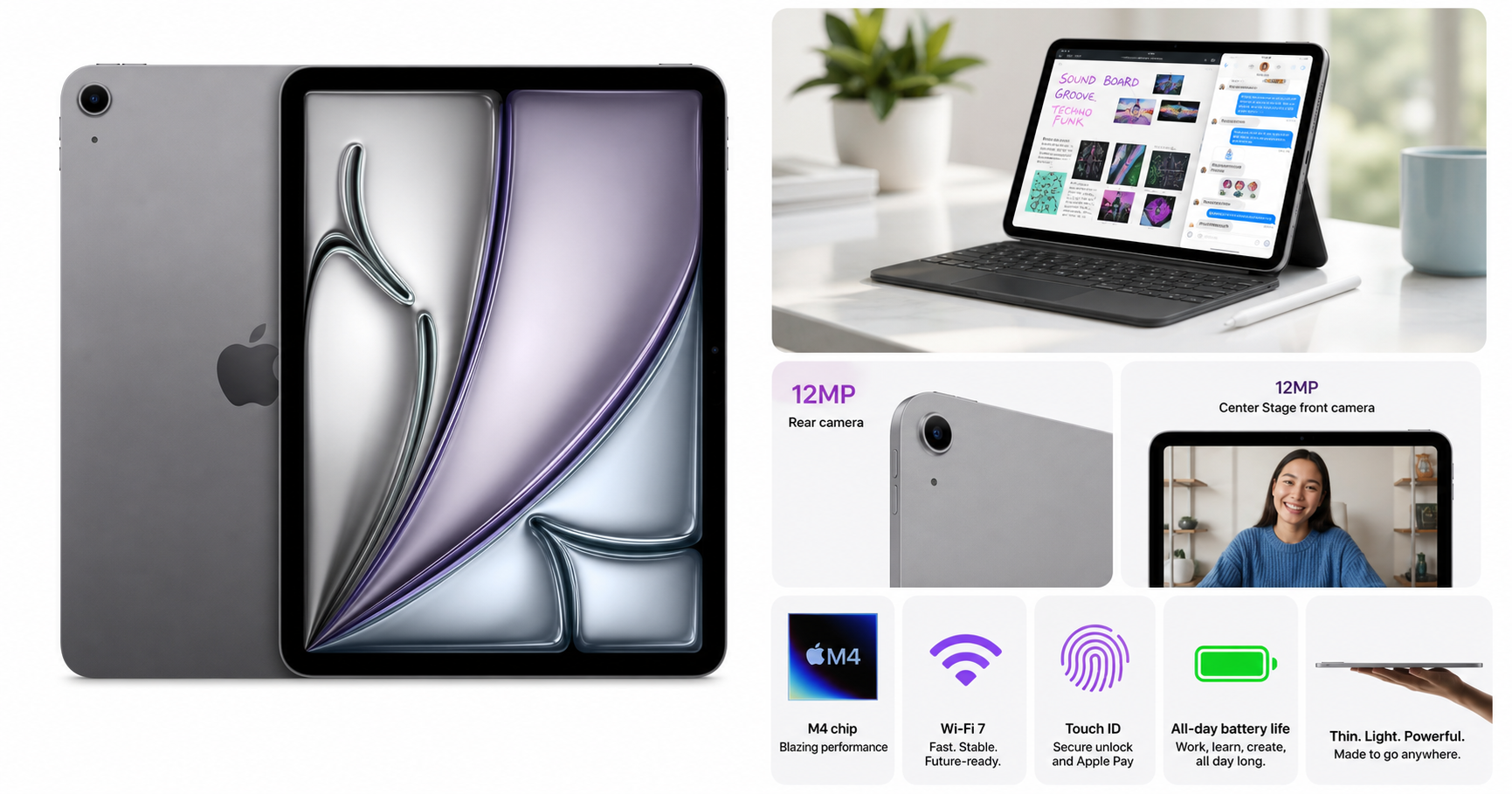
The Apple iPad Air 11‑inch (M4, 128GB, Wi‑Fi, Space Gray) is Apple’s latest mid‑tier tablet, bridging the gap between the entry‑level iPad and the premium iPad Pro. It features:
- An 11‑inch Liquid Retina display with wide color (P3), True Tone, and a sharp resolution suitable for reading, media, and light creative work.
- Apple’s M4 chip, bringing laptop‑class performance for multitasking, creative apps, and gaming.
- 128GB of storage in this configuration, aimed at general productivity, streaming, and apps.
- 12MP cameras on both front and back for clearer video calls, document scanning, and casual photography.
- Wi‑Fi 7 and the Apple N1 networking chip for faster and more reliable wireless performance (with a compatible router).
- Touch ID integrated into the top button for quick, secure unlocking and Apple Pay.
- All‑day battery life in a slim, lightweight chassis in Space Gray.
On $699.99, it sits firmly in the upper‑midrange tablet price bracket, targeting users who want performance and longevity without jumping to iPad Pro pricing.
Target Users
The iPad Air 11‑inch (M4) best fits:
- Students and educators who need a fast, flexible device for note‑taking, research, media consumption, and occasional creative projects.
- Professionals on the go who rely on email, documents, presentations, and video calls, and occasionally run heavier apps like photo editors or design tools.
- Content consumers who primarily stream video, browse the web, read, and use social apps but want a premium screen and responsive performance.
- Light creators (illustrators, photographers, hobbyist video editors) who want Apple Pencil and keyboard support without paying for the Pro line.
- iPad upgraders coming from older A‑series chips who want a future‑proof device with a long support window.
It’s less ideal for users who:
- Need ProMotion (120Hz) and the absolute best display color/brightness for professional graphics or HDR workflows.
- Require more than 128GB of local storage for large media libraries or complex offline editing projects and don’t want to rely heavily on cloud storage.
Main Benefits
1. M4 Performance in a Slim Package
The move to the M4 chip means the iPad Air now shares the same architecture as Apple’s latest Macs and iPad Pros. For everyday use, this translates into:
- Very smooth multitasking with multiple apps in Split View and Slide Over.
- Fast performance in productivity apps (Office, Google Workspace, note‑taking, PDF markup).
- Comfortable headroom for more demanding apps like Affinity Photo, Procreate, and advanced education apps.
For most mainstream users, that level of power is more than sufficient and should keep the device feeling fast over many OS upgrade cycles.
2. Quality 11‑Inch Liquid Retina Display
The 11‑inch Liquid Retina display strikes a balance between portability and workspace:
- Sharp resolution for text clarity when reading documents, PDFs, and ebooks.
- P3 wide color and True Tone for natural‑looking images and comfortable viewing in different lighting.
- Adequate brightness for indoor use and casual outdoor use, though not on the same level as the iPad Pro’s high‑end panels.
For streaming, browsing, and note‑taking, it feels premium without hitting Pro‑level pricing.
3. Future‑Ready Connectivity with Wi‑Fi 7
Support for Wi‑Fi 7 and Apple’s N1 networking chip positions the iPad Air well for the next several years:
- Higher throughput and lower latency on compatible Wi‑Fi 7 routers.
- More stable performance in congested environments like apartments, dorms, and offices.
Even on current Wi‑Fi 5/6 networks, you gain a modern wireless stack that should age better than older iPads.
4. Improved Camera Setup for Calls and Scans
With 12MP front and back cameras, the iPad Air is well‑equipped for:
- Video conferences and online classes, where clearer image quality and Apple’s software processing help.
- Document scanning and whiteboard capture, important for students and professionals.
- Casual photography and short video clips when you don’t want to reach for your phone.
While it won’t replace a flagship smartphone camera, it’s more than adequate for typical tablet camera use.
5. All‑Day Battery Life
Apple targets all‑day battery life, and for most mixed‑use scenarios (web, video, email, document editing), that’s realistic:
- A full school or work day of moderate use on a single charge.
- Efficient standby drain when the tablet is idle.
Heavy gaming or extended brightness at max will reduce runtime, but efficiency from the M4 helps keep battery life competitive.
Key Considerations
Before choosing the 11‑inch iPad Air (M4, 128GB), keep in mind:
-
Storage Ceiling (128GB)
- Fine for many users focused on streaming and cloud services.
- If you store a lot of offline 4K video, large game libraries, or heavy creative projects, you may find 128GB limiting over time.
-
No ProMotion Display
- The display is 60Hz; you don’t get the ultra‑smooth scrolling and Apple Pencil responsiveness found on iPad Pro models.
- For most users, this isn’t a deal‑breaker, but artists and high‑frame‑rate enthusiasts may prefer ProMotion.
-
Accessories Add to Total Cost
- Apple Pencil and keyboard cases (like Magic Keyboard or Smart Keyboard) are sold separately and can significantly increase your overall spend beyond $699.99.
- Budgeting for these is important if you plan to use the iPad as a laptop‑like device or for serious note‑taking/drawing.
-
Positioning vs. iPad Pro and Base iPad
- This Air is more capable and modern than the entry‑level iPad, but not as fully featured as the Pro line.
- Knowing your needs around display tech, storage, and professional apps will help you decide where it fits.
Pros
- Powerful M4 chip delivers laptop‑class performance in a thin, light tablet.
- 11‑inch Liquid Retina display with P3 color and True Tone is sharp and vibrant for most uses.
- Wi‑Fi 7 with Apple N1 for fast, future‑oriented wireless connectivity.
- 12MP front and rear cameras for high‑quality video calls and document scanning.
- Touch ID top button offers familiar, reliable biometric security.
- All‑day battery life for typical school or work days.
- Lightweight and portable design that’s easy to carry in a backpack or briefcase.
- Strong long‑term software support expected from Apple’s tablet lineup.
Cons
- No ProMotion (120Hz); 60Hz screen may feel less fluid compared with iPad Pro, especially for artists or power users.
- 128GB base storage can be limiting for heavy local media and large creative projects over time.
- Accessories sold separately, and adding a keyboard and Apple Pencil can push the effective cost well above $699.99.
- LCD panel instead of the higher‑end display technologies found on iPad Pro, which matters for HDR and professional color work.
Alternatives
If you’re considering the iPad Air 11‑inch (M4) but aren’t sure it’s the perfect fit, here’s how it conceptually compares to nearby options in Apple’s lineup:
-
Entry‑Level iPad (10th generation or successor)
- Better if: You want a more affordable iPad primarily for light browsing, streaming, and occasional note‑taking.
- Trade‑offs: Less powerful processor, potentially smaller or less advanced display, and slightly shorter long‑term headroom for demanding apps.
-
iPad Pro 11‑inch (M4)
- Better if: You are a professional creator or power user who needs ProMotion 120Hz, higher brightness, more storage options, and potentially more advanced display tech.
- Trade‑offs: Noticeably higher price, which may be unnecessary if you mostly do mainstream tasks and light creative work.
-
Older iPad Air models (M1/M2)
- Better if: You find a good deal and don’t need the absolute latest CPU or Wi‑Fi 7.
- Trade‑offs: Slightly less performance headroom and older connectivity, which may age out sooner for demanding applications.
If you’re price‑sensitive and do not need the jump to M4 or Wi‑Fi 7, a discounted older Air or base iPad can be a reasonable alternative. If you are a professional artist, video editor, or color‑critical creative, the iPad Pro may justify its premium.
Conclusion
The Apple iPad Air 11‑inch (M4, 128GB, Wi‑Fi, Space Gray) is a well‑balanced tablet that brings much of Apple’s high‑end performance and design to a more accessible tier. With its M4 chip, solid Liquid Retina display, upgraded cameras, and Wi‑Fi 7 support, it’s an excellent choice for students, professionals, and everyday users who want a device that feels fast today and should remain capable for years.
While the lack of ProMotion and the 128GB storage ceiling may give some power users pause, for most buyers this iPad Air hits the sweet spot between capability, portability, and cost. If you’re looking for a versatile, long‑lasting iPad that can handle work, study, and entertainment with ease—and you’re comfortable adding accessories as needed—the 11‑inch iPad Air with M4 is an easy model to recommend.