
DUMOS 50" L Shaped Desk Review: Compact Corner Workstation for Gaming and Home Office
Quick Summary
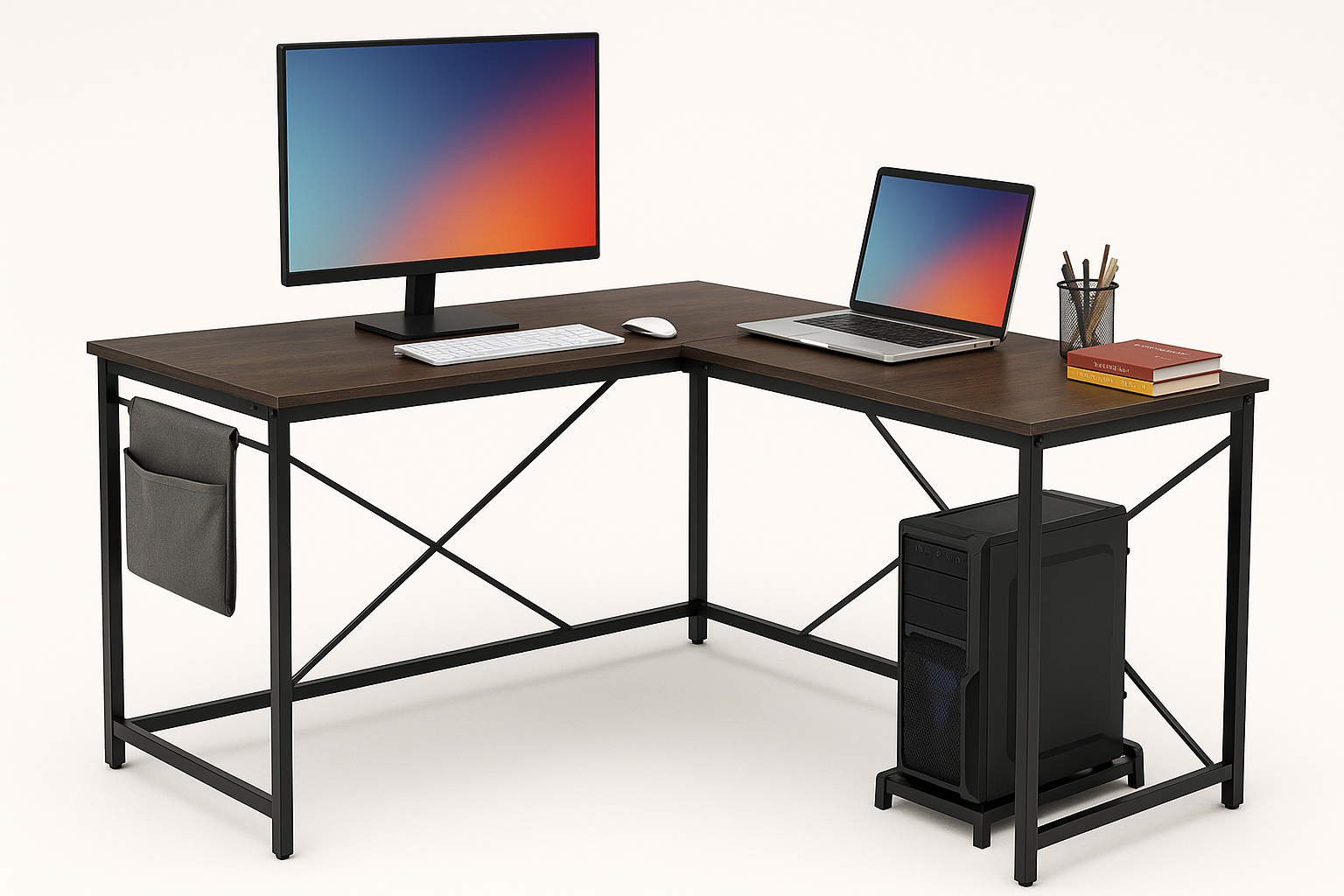
The DUMOS L Shaped Desk Computer Gaming Corner Table 50 Inch is a compact, budget-friendly L-shaped desk aimed at students, home office workers, and casual gamers who need to maximize a corner or smaller room.
Key points:
- 50-inch L-shaped surface sized for one or two monitors plus a laptop.
- Corner-friendly layout that makes efficient use of bedroom or dorm space.
- Side fabric storage bag for quick-access items and a dedicated CPU stand to keep a tower off the floor.
- Metal frame with X-shaped reinforcements and MDF top designed to support a full PC setup.
- Assembly is straightforward, with most users able to complete it in under an hour.
For buyers who want a simple, modern-looking corner desk without paying premium-furniture prices, the DUMOS L-shaped desk offers a solid mix of functionality and footprint at around $69.99.
Detailed Analysis
Design and Dimensions
This DUMOS model is a 50-inch L-shaped desk designed to fit snugly into a corner. One side of the "L" acts as a primary work surface for your monitor, keyboard, and mouse, while the return can host a laptop, console, printer, or writing area.
Typical use cases include:
- Single or dual-monitor PC setups with a mid-tower on the included CPU stand.
- Student study station with a monitor or laptop on one side and textbooks on the other.
- Compact gaming station in a bedroom where floor space is limited.
The rectangular lines and simple metal frame give it a neutral style that fits with most modern or minimalist rooms. It’s not a flashy RGB gaming desk; it leans more toward a clean, functional office look that still works well for gaming rigs.
Materials and Build Quality
The desk uses:
- MDF (engineered wood) desktop with a smooth surface.
- Metal frame with cross-bracing on the sides or back to improve rigidity.
- A fabric side storage bag attached to the frame.
- A separate CPU stand for a desktop tower.
For the price bracket, the build quality is generally in line with expectations:
- The metal frame offers decent stability once all screws are fully tightened.
- MDF is not real hardwood, but it’s standard at this level and should be fine for typical office and gaming use if you avoid excess moisture and heavy impacts.
- The finish is usually scratch-resistant enough for keyboards and mice, though a mousepad and coaster are recommended to extend the surface’s life.
Weight capacity is suitable for:
- A dual-monitor setup with stands or a monitor arm attached via clamp (as long as you stay within reasonable weight and clamp within the metal-frame-supported areas).
- Typical peripherals like speakers, a small printer, and accessories.
Layout and Functionality
The L shape is the main draw here. It allows separation of tasks:
- Primary zone: Monitor, keyboard, mouse, and main PC.
- Secondary zone: Notebook, drawing tablet, console, or paperwork.
Key functional features:
- CPU stand: Keeps your tower off the floor, helping with airflow and reducing dust intake compared with placing it directly on carpet.
- Side storage bag: Useful for storing controllers, cables, notebooks, or even a power strip. Being fabric, it’s quieter than a metal drawer and won’t scratch accessories, but it doesn’t provide the structure of hard shelves.
- Leg room: The open frame provides comfortable leg clearance on both sides of the L, though users with very long legs may want to double-check the height.
Cable management is basic—there are no elaborate routing channels or grommets built into the desktop. Most users will rely on cable clips, zip ties, or under-desk trays if they want a fully hidden wiring setup.
Stability and Everyday Use
Once assembled and placed against a wall or into a corner, the desk feels reasonably stable for everyday typing, mouse use, and casual gaming. The X-shaped braces help reduce wobble, though there may still be slight movement if you lean heavily on one corner, as is normal in this price range.
This desk is best suited for:
- Remote work: Keyboard, mouse, 1–2 monitors, and a laptop dock.
- Student work: Room for a computer plus textbooks and note-taking space.
- Casual gaming: Space for a PC, console, and a few accessories.
Heavy studio equipment, large printers, or very heavy multi-monitor stands might require more robust (and more expensive) furniture.
User Experience
Assembly
The DUMOS L-shaped desk is designed for DIY assembly with included hardware and tools. The process typically involves:
- Building the metal frame components for each side of the L.
- Attaching the cross-braces for rigidity.
- Placing and fastening the desktop panels to the frame.
- Installing the side storage bag and CPU stand.
Most users can expect:
- Assembly time of roughly 30–60 minutes for one person, faster with a helper.
- Clearly labeled parts and step-by-step diagrams.
- Pre-drilled holes that generally line up well, though you may need to leave some screws slightly loose until all panels are in place before fully tightening.
Daily Comfort and Ergonomics
From an ergonomic standpoint:
- The height is typical for a fixed desk and will work for most adults with a standard office chair.
- The depth is adequate for monitors at a comfortable viewing distance, leaving space for a keyboard and wrist support.
- The L configuration lets you pivot between tasks instead of crowding everything onto a single straight surface.
To optimize comfort:
- Pair the desk with an adjustable chair and, ideally, a monitor arm or riser so the top of the screen sits near eye level.
- Consider a keyboard tray if you need more precise ergonomic alignment, though that would be an aftermarket addition.
Noise and Surface Feel
- The MDF top is generally quiet under typical typing and mouse movements.
- With rubber or plastic feet on the frame, there’s minimal noise transferring through the floor.
- The desktop’s smooth finish works well with a standard mousepad and is easy to wipe clean with a damp cloth.
Pros
- Space-saving L-shaped design that makes efficient use of corners and small rooms.
- 50-inch width provides enough room for one or two monitors plus a laptop or textbooks.
- Dedicated CPU stand helps protect your PC from dust and improves airflow compared with floor placement.
- Side fabric storage bag keeps frequently used items close at hand without taking up desktop space.
- Metal frame with cross-bracing offers decent stability for typical home and student setups.
- Neutral, modern style that fits gaming, study, or work environments.
- Accessible price point around $69.99, making it attractive for budget-conscious buyers setting up a first office or dorm room.
Cons
- No built-in cable management, so wires may look messy without additional clips or organizers.
- MDF desktop, while standard for this range, is less durable than solid wood and can be vulnerable to water damage if spills aren’t cleaned quickly.
- Limited premium features—no drawers, keyboard tray, built-in USB ports, or LED lighting.
- Fixed height, so users seeking advanced ergonomics or sit-stand capability will need a different category of desk.
- Fabric storage bag can sag if overloaded and doesn’t offer the structure of hard shelves or drawers.
Value Assessment
In the broader market of L-shaped desks, the DUMOS 50" model sits firmly in the budget-friendly segment. It’s designed for buyers who want:
- A functional, corner-optimized desk.
- Enough surface for basic productivity or gaming.
- A few practical extras (CPU stand, side bag) without inflating the cost.
At roughly $69.99, its value comes from:
- A footprint that works well in small bedrooms and apartments.
- A practical configuration for dual-purpose use (schoolwork + gaming, or work + hobby).
- Materials and stability that are appropriate for light to moderate daily use.
It won’t compete with high-end solid-wood or electric sit-stand corner desks, but as an entry-level or midrange solution for a compact space, it offers a good return on investment.
Who It’s Best For
- Students who need a dedicated corner workstation that fits in a dorm or small bedroom.
- Remote workers who want a low-cost, L-shaped desk for a home office or shared room.
- Casual gamers building a first or secondary setup without investing in premium furniture.
- Renters who want something functional and relatively easy to move or disassemble later.
Who Should Consider Alternatives
- Users needing heavy-duty load capacity for large multi-monitor arms, studio gear, or heavy printers.
- Buyers who want drawers, cabinets, or integrated cable channels built into the desk.
- Ergonomics-focused users looking for height-adjustable or standing L-shaped desks.
Final Thoughts
The DUMOS L Shaped Desk Computer Gaming Corner Table 50 Inch delivers a straightforward, space-efficient solution for small rooms and corner setups. Its combination of a 50-inch L-shaped surface, CPU stand, and side storage bag makes it a practical choice for students, remote workers, and casual gamers who want to organize their gear without overspending.
If your priorities are compact size, functional layout, and affordable pricing more than premium materials or advanced features, this DUMOS L-shaped desk is a strong contender. With realistic expectations about its MDF construction and basic feature set, it can serve as a reliable centerpiece for a budget-conscious home office or bedroom gaming station.