
Epson EcoTank ET-2800 Review: Affordable Cartridge‑Free Printing for Basic Home Use
Introduction
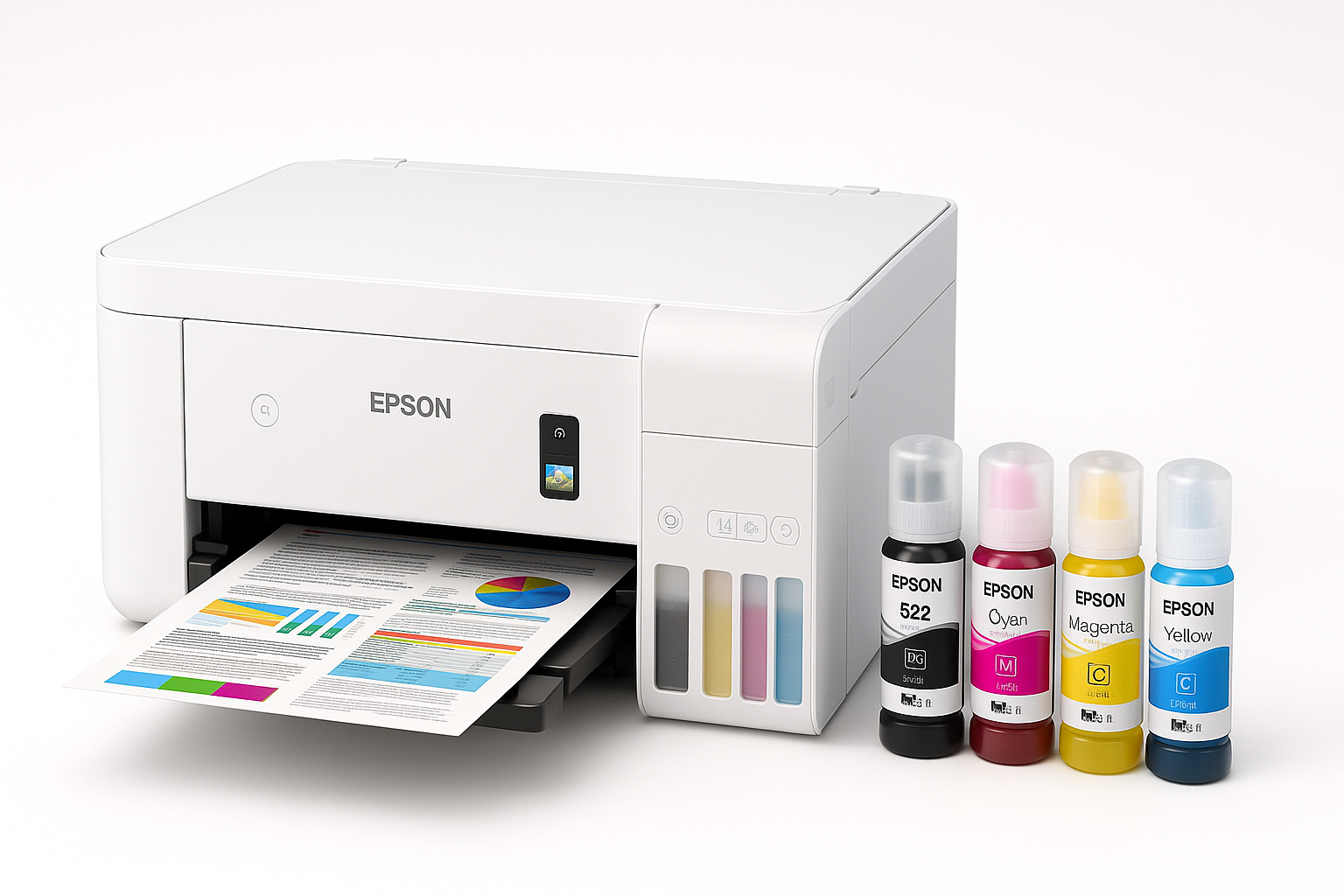
The Epson EcoTank ET-2800 Wireless Color All-in-One Cartridge-Free Supertank is aimed squarely at families, students, and home offices that are tired of frequent cartridge changes and unpredictable ink costs. Instead of traditional cartridges, the ET-2800 uses large, refillable ink tanks and EcoFit bottles, promising thousands of pages per refill and significantly lower running costs over time.
It’s a compact, entry-level all-in-one that prints, scans, and copies in color, with built-in Wi‑Fi, support for mobile printing (including Apple AirPrint, Mopria, and Epson’s own apps), and a small color LCD for basic control. If you’re looking at this model on Amazon at around $239.99, the core question is whether its long-term ink savings and simple feature set outweigh its modest speed and lack of more advanced office features.
Setup / Getting Started
Out of the box, the ET-2800 includes the printer, power cable, a "Start Here" guide, a CD or online setup resources, and four EcoTank 522 ink bottles (black, cyan, magenta, yellow). The initial setup breaks down into three main steps:
-
Physical setup
- Remove the protective tape and packing materials.
- Connect the power and turn the printer on.
- Use the 1.44-inch color LCD and directional buttons to choose language and basic settings.
-
Filling the ink tanks
- Lift the tank cover and open each color’s cap.
- Each EcoFit bottle is keyed to the correct tank, so it only fits into the matching color opening, which helps avoid mistakes.
- Once seated, ink flows automatically until the tank is full; then you close the cap and move to the next color.
- There is minimal risk of spilling if you follow the instructions, but first-time ink tank users should still work on a protected surface.
-
Priming and software installation
- The printer runs an ink charging cycle, which can take several minutes.
- For computers, you can install drivers via Epson’s website or bundled CD (on supported systems).
- For mobile devices, the Epson Smart Panel app (iOS/Android) walks you through connecting the printer to your Wi‑Fi network and adding it to phones and tablets.
Overall, setup is straightforward if you follow the on-screen and app prompts. The only potential friction point for some users is Wi‑Fi configuration; those unfamiliar with wireless setup may need to carefully follow the app instructions or use USB for initial installation.
Daily Usage
Once configured, the ET-2800 is best suited for:
- Everyday home documents – school assignments, recipes, travel confirmations, web pages, simple work documents.
- Occasional photos – especially snapshots on 4x6 or 5x7 glossy photo paper.
- Basic scanning and copying – IDs, bills, forms, and reference materials via the flatbed scanner.
Printing experience
The rear input tray holds about 100 sheets of plain paper and supports a selection of sizes from 4" x 6" photo paper up to letter and legal. The printer feeds from the back and outputs to a front tray, which is adequate for light to moderate home use.
- The control panel’s small color LCD is not touch-enabled, so you’ll navigate with physical buttons. It’s enough for selecting Wi‑Fi settings, checking ink levels, and initiating copy or maintenance tasks.
- For most users, printing from a phone, tablet, or laptop via Wi‑Fi will be the primary workflow. Support for common wireless printing standards makes it easy to send jobs without manually installing complex software on every device.
Scanning and copying
The ET-2800 uses a flatbed scanner, which is ideal for:
- One-off scans of documents, photos, and IDs.
- Making quick color or black-and-white copies without a PC.
Because there’s no automatic document feeder (ADF), multi-page documents must be scanned or copied one sheet at a time, which is acceptable for intermittent home use but not ideal for high-volume paperwork.
Performance & Reliability
Print speed and quality
The ET-2800 is built for quality and efficiency rather than raw speed.
- Rated speeds: Up to about 10 ISO pages per minute (ppm) in black and 5 ppm in color under standard conditions.
- Typical home usage: Short text documents (1–3 pages) print in reasonable time; long reports or large photo print runs will feel slow compared with higher-end office printers.
Print quality is generally strong for this class:
- Text documents: Sharp and readable for homework, letters, and basic office documents.
- Color graphics: Good color saturation and clarity for charts, infographics, and simple marketing or school materials.
- Photos: Attractive on quality photo paper, though this is not a dedicated photo printer; color accuracy and detail will satisfy casual users but may not meet professional photo standards.
Epson’s Micro Piezo Heat‑Free technology helps deliver consistent output and can be more energy‑efficient than some thermal inkjet designs.
Ink efficiency and running costs
The defining advantage of the EcoTank system is low cost per page:
- A full set of included ink bottles is rated to print thousands of pages (with black yield and combined color yield far beyond what starter cartridges usually offer).
- Replacement bottles are typically much cheaper per page than cartridges, especially if you print frequently over several years.
For households that print regularly, this can translate to substantial savings versus a low-cost cartridge printer that requires frequent refills. Occasional users still benefit from the reduced likelihood of constantly buying new cartridges, though any inkjet printer can be prone to nozzle clogs if left unused for long stretches.
Reliability considerations
User feedback on this model is mixed, which is important to understand in context:
- Many owners report smooth operation, good print quality, and appreciation for the low ink costs once the printer is properly set up and kept updated.
- Some users, however, have noted issues such as difficult Wi‑Fi setup, slow scanning speeds, or color printing problems that require head cleaning or support intervention.
In practice, reliability tends to be best when:
- The printer is powered on regularly and prints at least a few pages every week or two.
- Firmware and drivers are kept up to date.
- Built‑in maintenance tools (nozzle check, head cleaning, alignment) are used promptly if print quality degrades.
Epson includes a limited warranty (typically one year) and offers ongoing technical support, which can help resolve setup glitches or print-quality issues.
What Works Well
1. Exceptionally low running costs
The key selling point is the cartridge‑free EcoTank design. Large, refillable tanks and inexpensive ink bottles mean a very low cost per page, especially for color documents. For families with school-age children or home workers printing regularly, this can offset the upfront investment over time.
2. Simple, compact all‑in‑one design
The ET-2800 is relatively small for a tank printer, making it easy to place on a desk or shelf. It covers the essentials—print, scan, copy—without the bulk and complexity of office‑class models.
3. Good everyday print quality
Text is crisp enough for most home and homework needs, and color graphics and photos look appealing on the right paper. It strikes a good balance between quality and ink efficiency for general use.
4. Strong wireless and mobile support
Built‑in Wi‑Fi, support for common mobile printing standards, and the Epson Smart Panel app make it easy to print from laptops, smartphones, and tablets throughout the home.
5. Environmentally friendlier approach
By eliminating small disposable cartridges, the EcoTank system reduces plastic waste and packaging compared with traditional cartridge models, which is a plus for environmentally conscious buyers.
What Could Be Improved
1. No automatic document feeder (ADF)
All scanning and copying is done via the flatbed, one sheet at a time. For users who frequently handle multi‑page forms or need to digitize long documents, this can become tedious and time‑consuming.
2. Modest print and scan speeds
With speeds around 10 ppm in black and 5 ppm in color, this printer is adequate for light documents but not ideal for heavy workloads. Scanning speeds, in particular, can feel slow if you routinely handle multi‑page jobs.
3. Basic control panel
The 1.44‑inch color LCD and button-based navigation get the job done but feel dated next to larger touchscreens on modern printers. Complex tasks are usually easier to manage from the app or a computer.
4. Potential connectivity challenges for some users
While many owners set up Wi‑Fi without issues, less tech‑savvy users may find the initial network configuration confusing. Carefully following the app’s step‑by‑step instructions helps, but this is not a plug‑and‑play experience for everyone.
5. Mixed user feedback on long‑term reliability
Most units function as expected, but there are reports of print head clogs, color output issues, or units failing after extended use. Regular, light use and timely maintenance can help reduce the risk, but buyers seeking enterprise‑grade durability might prefer a more robust office model.
Overall Impression
The Epson EcoTank ET-2800 Wireless Color All-in-One Cartridge-Free Supertank is a solid choice for households and students who:
- Want dramatically lower ink costs over the life of the printer.
- Primarily print basic documents and the occasional photo.
- Need wireless printing from multiple devices in a home environment.
- Don’t require office features like an ADF, duplex scanning, or very high speed.
At around $239.99, it is not the cheapest printer you can buy upfront, but its refillable tank design and high‑yield bottles can make it significantly more economical over the long term than a low-cost cartridge model, particularly for users who print frequently.
If you need a compact, no‑nonsense all‑in‑one that focuses on low running costs and everyday versatility rather than advanced office capabilities, the ET-2800 is well worth considering. However, if your workflow involves heavy multi‑page scanning, high‑volume printing, or mission‑critical reliability, you may want to look at more full‑featured models higher up in Epson’s EcoTank line or competing office‑class printers.