
Logitech MX Master 2S Bluetooth Edition Review: A Proven Productivity Mouse Without the Dongle
Updated: 03/20/2026
Created: 03/20/2026
Introduction
The Logitech MX Master 2S Bluetooth Edition Wireless Mouse targets professionals and power users who want a comfortable, feature‑rich pointing device that can keep up with heavy daily use. Although it is an older model in Logitech’s MX lineup, it remains popular thanks to its ergonomic design, excellent multi-surface tracking, and advanced scrolling and shortcut capabilities.
This specific "Bluetooth Edition" emphasizes Bluetooth Low Energy connectivity and typically does not include a USB receiver in the box, making it best suited for laptops and desktops with reliable built‑in Bluetooth.
Product overview and key features
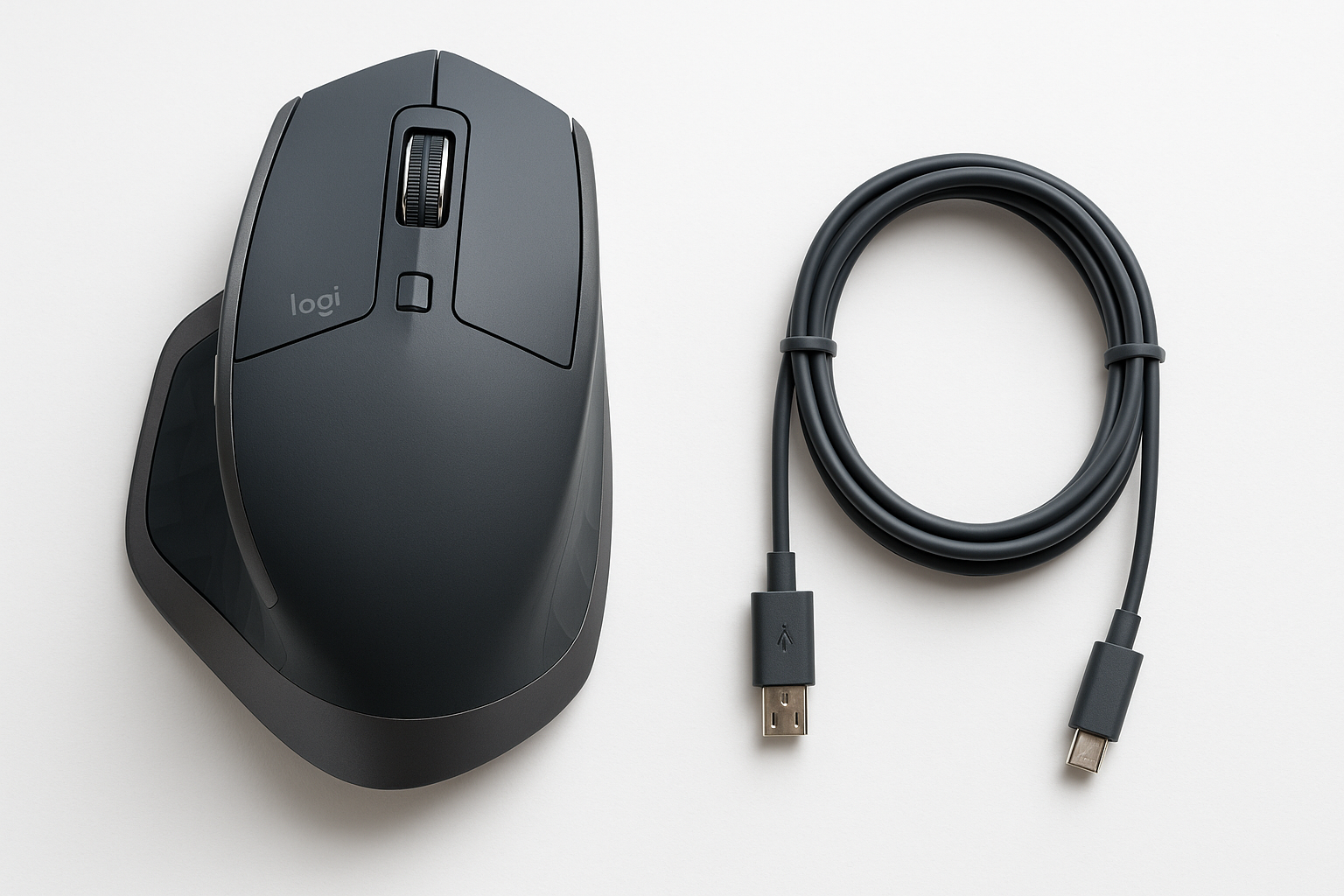
The MX Master 2S Bluetooth Edition is a right‑handed ergonomic mouse with a sculpted, high‑profile shape designed to support your palm and encourage a relaxed grip. Compared to basic office mice, it offers a more substantial feel and a larger thumb rest, which also houses some of its extra controls.
Design and ergonomics
- Right‑handed, sculpted shell: Built for palm and relaxed claw grips, with a pronounced hump and broad thumb rest.
- Thumb rest with gesture button: Pressing or tilting the thumb area can be mapped to gestures or shortcuts via Logitech’s software.
- Premium build feel: Soft‑touch plastics and textured side surfaces provide a secure grip and a more premium tactile impression than entry‑level mice.
Sensor and tracking
One of the standout elements of the MX Master series is Logitech’s Darkfield laser sensor:
- High DPI range: Up to 4000 DPI, adjustable in smaller steps to match your preference.
- Multi‑surface tracking: Darkfield tracking is designed to work reliably on a broad range of surfaces, including polished desks and many types of glass, which is a major advantage if you work without a mouse pad.
Connectivity and compatibility
The Bluetooth Edition focuses on Bluetooth Low Energy for a clean, dongle‑free setup:
- Bluetooth Low Energy connection: Pairs directly with compatible Windows and macOS systems without occupying a USB port.
- Support for up to three devices: You can pair the mouse with three different computers and switch between them instantly using the Easy‑Switch button on the underside.
- Unifying receiver support (not included): Even though this edition is sold without a dongle, the hardware remains compatible with Logitech Unifying receivers. If you already own one from another Logitech device, you can pair the MX Master 2S to it using Logitech’s software.
System requirements typically include modern versions of Windows and macOS with Bluetooth Low Energy support. The mouse is primarily intended for desktop OS use rather than mobile or gaming consoles.
Battery and charging
The MX Master 2S uses a built‑in rechargeable Li‑Po battery:
- Rechargeable over micro‑USB: A standard micro‑USB cable (often included in MX Master 2S packages) lets you recharge from your PC or a USB charger.
- Extended battery life claim: Under typical office conditions, a full charge is designed to last for weeks of regular use.
- Use while charging: You can continue using the mouse while it is plugged in, which minimizes downtime if the battery runs low.
Buttons, scrolling and customization
The MX Master 2S offers more inputs and scrolling options than a basic mouse:
- Primary buttons: Left and right click with a crisp, office‑friendly tactility.
- Hyper‑fast scroll wheel: The main wheel can switch between a ratcheted step mode for precision and a near‑frictionless free‑spin mode for quickly scrolling long documents or timelines.
- Side scroll wheel: A horizontal wheel near the thumb aids in side‑to‑side navigation in spreadsheets, timelines or design canvases.
- Forward/back thumb buttons: Useful for browser navigation or as customizable shortcuts in productivity apps.
- Gesture/Function button: Pressing or moving while holding this button can trigger additional shortcuts, such as virtual desktop switching or app‑specific commands.
Using Logitech’s configuration software (Options or Options+, depending on OS support), most of these controls can be remapped to keystrokes, app‑specific actions, or system functions.
Performance and user experience
Everyday productivity
In day‑to‑day office use, the MX Master 2S Bluetooth Edition is tailored for comfort and efficiency:
- Comfort for long sessions: The contoured body and thumb rest help reduce strain during long stretches of work, especially compared to smaller, flatter mice.
- Smooth tracking: The Darkfield sensor offers stable tracking on desks, mouse pads, and many glossy surfaces, providing accurate pointer control for documents, browsing, and light creative work.
- Multi‑device workflows: If you routinely switch between a laptop and a desktop, or between home and office machines, the three‑device pairing and Easy‑Switch button significantly reduce friction—no re‑pairing or plugging/unplugging dongles.
Bluetooth behavior
Because this is the Bluetooth Edition, Bluetooth performance is particularly important:
- Clean setup: No dongle required and no USB port consumed on modern laptops.
- Potential interference: As with many Bluetooth peripherals, performance can be impacted by crowded 2.4 GHz environments or older Bluetooth chipsets. Users sensitive to lag or occasional stutter may prefer to connect via a Unifying receiver if they already own one.
In most office environments with modern hardware, the mouse performs well over Bluetooth, but expectations should be calibrated: this is a productivity mouse, not a low‑latency gaming device.
Software and customization
Logitech’s configuration software allows:
- Per‑application button mappings (e.g., one set for your browser, another for Photoshop or Excel).
- Scroll‑wheel behavior adjustments, including smooth scrolling and speed.
- Pointer speed/DPI adjustments.
- Gesture configuration using the thumb gesture button.
The depth of customization is a major part of the MX Master 2S value proposition for power users who rely on shortcuts and workflow optimizations.
Gaming and creative work
The MX Master 2S can handle casual gaming and is perfectly capable for many creative tasks, but it is not tuned as a gaming mouse:
- Moderate weight: Heavier than typical esports‑oriented mice, making it less ideal for fast, repeated flicks.
- Bluetooth latency: Slightly higher input lag than wired or specialized 2.4 GHz gaming receivers; fine for everyday work, but not optimal for competitive play.
For photo editing, general design, and content creation, the precise sensor and side scroll wheel can be very helpful. For competitive gaming, a dedicated gaming mouse would still be the better choice.
Pros and cons
Pros
- Comfortable, sculpted ergonomic shape suitable for long hours of use.
- Darkfield sensor offers reliable tracking on a wide range of surfaces, including many glass desks.
- Hyper‑fast scroll wheel plus side scroll wheel for efficient navigation in large documents and timelines.
- Connects to up to three devices and switches between them quickly via the Easy‑Switch button.
- Bluetooth Low Energy connection eliminates the need for a dongle on modern laptops and desktops.
- Still compatible with Logitech Unifying receivers (though not bundled in this Bluetooth Edition), providing flexibility if you already use other Logitech devices.
- Deep button and gesture customization through Logitech’s software.
- Rechargeable battery with long‑lasting performance between charges and the ability to use while charging.
Cons
- Bluetooth Edition typically ships without a USB receiver, which may be inconvenient for systems with unreliable or absent Bluetooth.
- Heavier and bulkier than simpler mice; not ideal for users who prefer small, lightweight designs or ultra‑portable setups.
- Not intended as a gaming mouse; Bluetooth latency and weight make it sub‑optimal for competitive titles.
- Uses micro‑USB rather than newer USB‑C for charging.
- As an older MX‑series model, it lacks some refinements and sensor updates found in newer MX Master generations.
Conclusion and recommendation
The Logitech MX Master 2S Bluetooth Edition Wireless Mouse remains a compelling option for users who prioritize ergonomics, multi‑surface tracking, and productivity‑enhancing controls. Its sculpted shape, Darkfield sensor, and combination of vertical and horizontal scroll wheels make it well‑suited to office work, coding, content creation, and general everyday computing.
The Bluetooth‑only packaging is especially attractive if you use a modern laptop and want to keep your USB ports free, and it still leaves open the possibility of using a Logitech Unifying receiver you may already own. However, buyers who demand ultra‑low‑latency input for gaming, or who prefer newer charging ports such as USB‑C, may want to consider more recent MX Master models or dedicated gaming mice.
If your focus is on comfort, versatility, and productivity rather than esports‑level performance, the Logitech MX Master 2S Bluetooth Edition is a well‑rounded, proven mouse that can significantly improve your daily workflow at a competitive price point like $52.49 when found on sale or through trusted retailers.