
MCGOR 10-Inch Rechargeable Under Cabinet Lights Review: Flexible, Cord-Free Lighting for Dark Spaces
Introduction
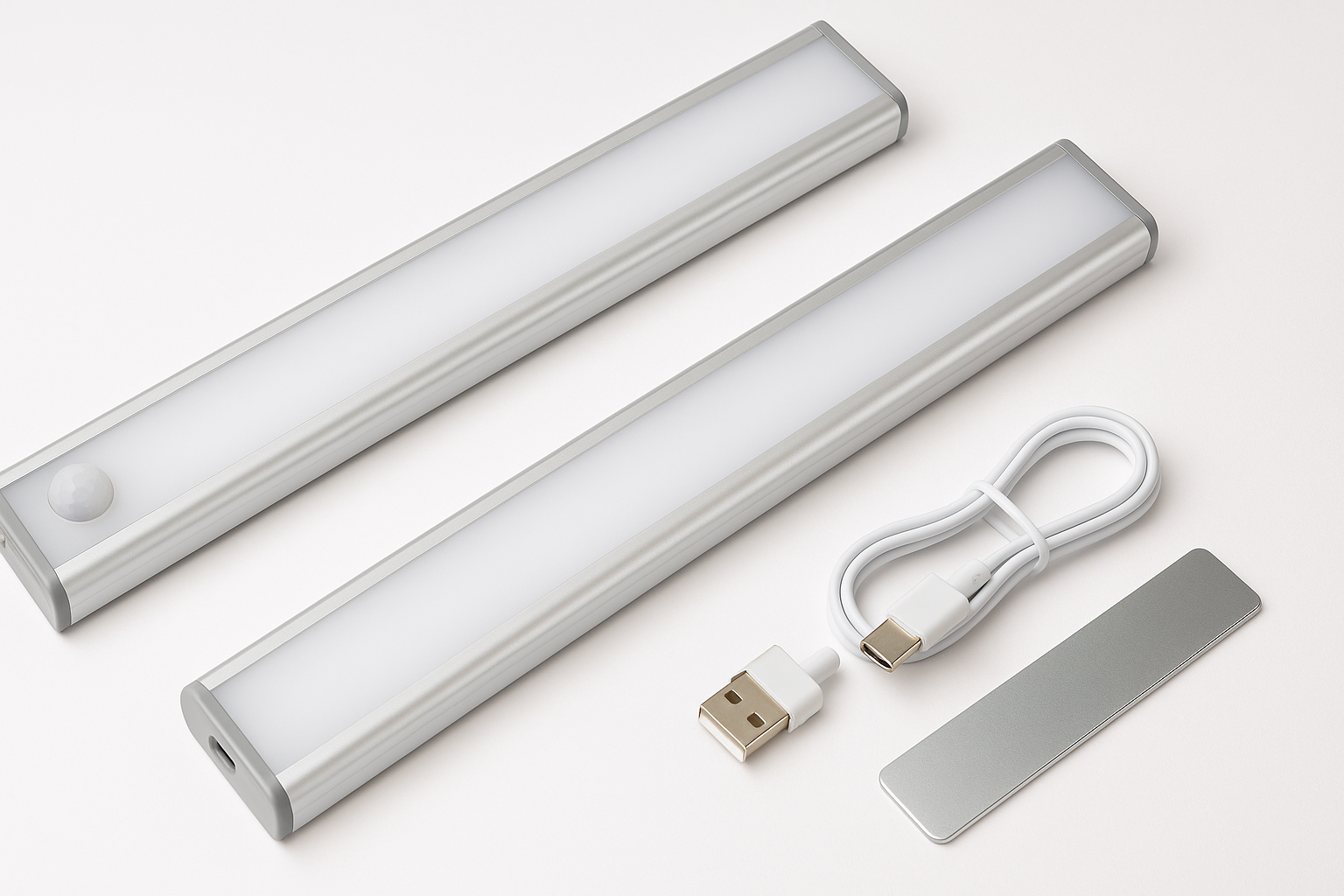
The MCGOR 10inch Under Cabinet Lighting, 2 Pack is a wireless LED light bar kit aimed at people who want better task and ambient lighting without running wires or hiring an electrician. Each bar integrates a motion sensor, built‑in rechargeable battery, 40 LEDs behind a frosted diffuser, and a magnetic mounting system. You can run them in motion‑sensor mode, always‑on mode, or turn them fully off, and adjust brightness across five levels.
Sold as a two‑light kit around $16.99, it targets renters, condo owners, and anyone with dark cabinets, pantries, staircases, or closets where adding hardwired lighting would be costly or impractical.
Typical Use Cases
1. Under‑Cabinet Kitchen Task Lighting
In the kitchen, the MCGOR bars are primarily used under upper cabinets to illuminate countertops for food prep, coffee stations, or small appliance areas.
- Goal: Create focused, shadow‑reducing task lighting without wiring.
- How it’s used: Mounted with the included magnetic metal strips or directly to metal cabinets; often set to medium or high brightness, either always‑on during cooking or in motion‑sensor mode for casual use.
2. Closets, Wardrobes, and Pantry Shelves
These bars are well suited to enclosed or semi‑enclosed spaces that lack built‑in lighting.
- Goal: Automatically light up when you open a door or walk into a small dark space.
- How it’s used: Typically in motion‑sensor mode so the lights switch on when you step within roughly 10 ft in low light and auto‑off after about 20 seconds of inactivity.
3. Hallways, Stairs, and Night‑Light Applications
For safety lighting, one bar can be mounted low on a wall, along baseboards, or on stair risers.
- Goal: Provide low‑glare guidance lighting at night without needing to find a switch.
- How it’s used: Usually set to a lower brightness level in motion‑sensor mode to avoid harsh light in the middle of the night.
4. Bookshelves, Cabinets, and Display Areas
Because the lights are slim and magnetic, they can be tucked into bookshelves, glass cabinets, or other display furniture.
- Goal: Accent lighting for books, collectibles, and decor.
- How it’s used: Frequently in always‑on mode at low to medium brightness for a softer, decorative glow.
5. Portable Utility Light (Camping, Garage, Power Outages)
The always‑on mode, USB‑C charging, and magnetic base make each bar usable as a portable light.
- Goal: Provide temporary lighting where power outlets are unavailable.
- How it’s used: Detached from its mount and used as a handheld light in garages, for car repairs, camping, or as an emergency flashlight during outages.
Performance in Each Scenario
Brightness and Light Quality
Each MCGOR bar uses 40 LEDs behind a frosted cover, which helps soften the output and reduce glare. The 5‑level dimming is a major advantage over many budget competitors that have only one fixed brightness.
- Kitchen counters: At 100% brightness, a single bar provides enough light for a modest countertop segment. Two bars placed under a typical 30–36 inch cabinet run provide noticeably more even coverage.
- Closets/pantries: Even at mid‑level brightness, the light is ample for quickly identifying clothes, boxes, or food items.
- Night‑light use: The lower brightness settings strike a good balance between visibility and comfort, especially on stairs or hallway walls.
Color temperature options vary by listing (there are variants like white light, warm white, or 3‑color), but this specific 10‑inch model is often sold in neutral to cool white, which favors task clarity over warm ambience.
Motion Sensor Responsiveness
In motion‑sensor mode, the bar:
- Activates when it detects movement within approximately 120° and up to around 10 ft in a dark or low‑light environment.
- Stays on for about 20 seconds after the last detected motion.
In practical use:
- Under‑cabinet: If your counter is within a few feet of the sensor, it typically triggers as you step up or move your hands under the cabinet.
- Closet/pantry: Works best when mounted so the sensor faces the opening; doors can partially block detection if positioned poorly.
- Stairs: When mounted along the wall or riser, most users will trigger the sensor as they start climbing/descending.
Feedback on similar MCGOR bars suggests motion detection can be slightly inconsistent in edge cases—especially in brighter rooms, very oblique angles, or if mounted too high or deep under cabinets. For most straightforward placements, however, the sensor behavior is acceptable for the price segment.
Battery Life and Charging
Each bar contains a built‑in 1800 mAh rechargeable battery and charges via USB‑C. Claimed runtime is:
- 7–45 days per charge in motion‑sensor mode (depending on activation frequency and brightness level).
- About 8 hours of continuous use in always‑on mode at 100% brightness.
Real‑world expectations:
- Heavy kitchen use (frequent on/off cycles while cooking) will skew toward the shorter end of the motion‑mode range, especially if you run a high brightness setting.
- Occasional closet/pantry or hallway use can come closer to the multi‑week estimate.
- Always‑on use should be treated as an intermittent feature; running them as continuous desk or work lights will require frequent charging.
USB‑C charging is a positive: it’s more convenient and widely compatible than micro‑USB. However, there’s no bundled wall adapter, so you’ll use an existing phone or tablet charger.
Installation and Mounting
Installation is deliberately simple and renter‑friendly:
- Built‑in magnets let the bars snap directly to any ferrous metal surface.
- For non‑metal surfaces, you get adhesive metal plates that stick to the cabinet, wall, or shelf; the light then attaches magnetically to the plate.
This approach has several advantages:
- No drilling or permanent modification required.
- You can easily remove each bar for charging and snap it back into the exact position.
- You can reposition lights as your layout or needs change.
The main caveat is that adhesive performance depends on surface cleanliness and texture. On very rough, dusty, or oily surfaces, you may need to clean thoroughly or consider supplemental mounting hardware.
Strengths Across Scenarios
-
True Wireless, No Wiring Required
Ideal for renters, older homes, or areas where adding outlets or running cable is impractical. The self‑contained battery and motion sensor make it a drop‑in solution. -
Flexible Motion + Always‑On Modes
You can run them as auto‑on closet or stair lights, or as temporary task lights in always‑on mode. This flexibility broadens their usefulness beyond simple under‑cabinet duty. -
5‑Level Dimming
Many inexpensive bars offer only a single brightness level. Here, 5 levels let you dial in brightness for:- High output during food prep or detailed work.
- Mid‑range for closets and pantries.
- Low levels for night‑light or hallway safety lighting.
-
USB‑C Rechargeable with Decent Runtime
The 1800 mAh battery plus USB‑C charging is modern and convenient. For light to moderate motion‑sensor use, having to recharge every few weeks is manageable and removes the ongoing cost and waste of disposable batteries. -
Magnetic Mounting Is Simple and Reusable
Both installation and removal are straightforward. This is helpful for:- Charging.
- Seasonal repositioning (for example, moving one bar from holiday decor back to the kitchen).
- Temporary uses like camping or emergency lighting.
-
Good Value for a 2‑Pack
At around $16.99 for two bars, you get a full lighting solution for a small kitchen run or multiple dark closets without paying for an electrician or high‑end smart‑home gear.
Limitations Across Scenarios
-
Battery Management and Recharging
Being rechargeable is both a strength and a trade‑off:- If you rely on them daily, you must remember to recharge—especially in always‑on mode.
- Users who strongly prefer a “set it and forget it” solution may find this chore inconvenient.
-
Motion Sensor Sensitivity and Line of Sight
The sensor performs well when it has a clear view of the area you move through, but it can be less reliable if:- The light is recessed far under a cabinet lip.
- Doors or tall objects block the sensor.
- The ambient light is bright enough to confuse the “low‑light only” logic.
Careful placement mitigates many of these issues, but it’s not as foolproof as a wired system with a wall‑mounted motion detector.
-
Limited Continuous Runtime
Eight hours at full brightness on always‑on mode is fine for short tasks or occasional ambient lighting, but not enough for people who want a light bar they can leave on all evening every day. For that, a wired or plug‑in under‑cabinet system is still better. -
Adhesive Longevity Depends on Surface
Over time, in kitchens with steam and grease or in humid basements, the adhesive for the metal plates may weaken, especially on:- Rough or uneven surfaces.
- Unfinished wood or dusty concrete.
Most users won’t have issues if surfaces are cleaned before installation, but it’s something to note for high‑humidity or high‑grease environments.
-
Not a Smart‑Home or Color‑Tunable Product
The MCGOR bars are straightforward LED utility lights. There’s no app control, smart‑home integration, or color‑changing capability. If you’re seeking dynamic RGB or integrated smart‑lighting scenes, this kit is intentionally more basic.
Verdict
The MCGOR 10inch Under Cabinet Lighting, 2 Pack delivers a practical balance of price, features, and ease of installation for everyday users who want to brighten dark spaces without any wiring.
Recommended for:
- Renters and homeowners who want simple, non‑permanent under‑cabinet lighting.
- Closets, pantries, hallways, and staircases where automatic motion‑activated light adds real convenience and safety.
- People who prefer USB‑C rechargeable products and don’t mind occasional recharging.
- Users who value multiple brightness levels but don’t need app control or advanced smart features.
Not ideal for:
- Anyone seeking always‑on, all‑evening lighting with zero maintenance—wired or plug‑in systems remain better for that.
- Users who require perfectly consistent, long‑range motion detection, especially in very bright spaces or behind obstacles.
- Buyers who want smart‑home integration or color‑tunable ambiance.
At roughly $16.99, the MCGOR 10‑inch bars stand out as a well‑rounded, renter‑friendly solution for adding useful light exactly where you need it most. If your priority is quick installation, motion activation, and adjustable brightness in a compact form factor, this 2‑pack is a strong contender in the budget under‑cabinet lighting category.