
MySoftware My Software Business Publisher Review: Legacy Design Tools for Simple Marketing Projects
Quick Summary
MySoftware My Software Business Publisher is an older desktop publishing application designed to help small businesses and home offices design and print their own marketing materials without needing graphic design expertise. It focuses heavily on ready-made templates and step-by-step workflows, making it approachable for non‑technical users.
While the feature set – including support for brochures, flyers, postcards, and business cards – remains serviceable for basic print projects, this is legacy software. It was originally released in the early 2000s and is intended for Windows XP through Windows 8 environments, not modern versions like Windows 10 and 11. That means it can still have value in very specific scenarios, but it is not a general‑purpose recommendation for current systems.
If you can run it in a compatible Windows environment and only need straightforward print pieces based on templates, it can be a low‑barrier way to produce simple marketing materials at a one‑time cost of $16.99 instead of subscribing to modern design services.
Detailed Analysis
Features and Capabilities
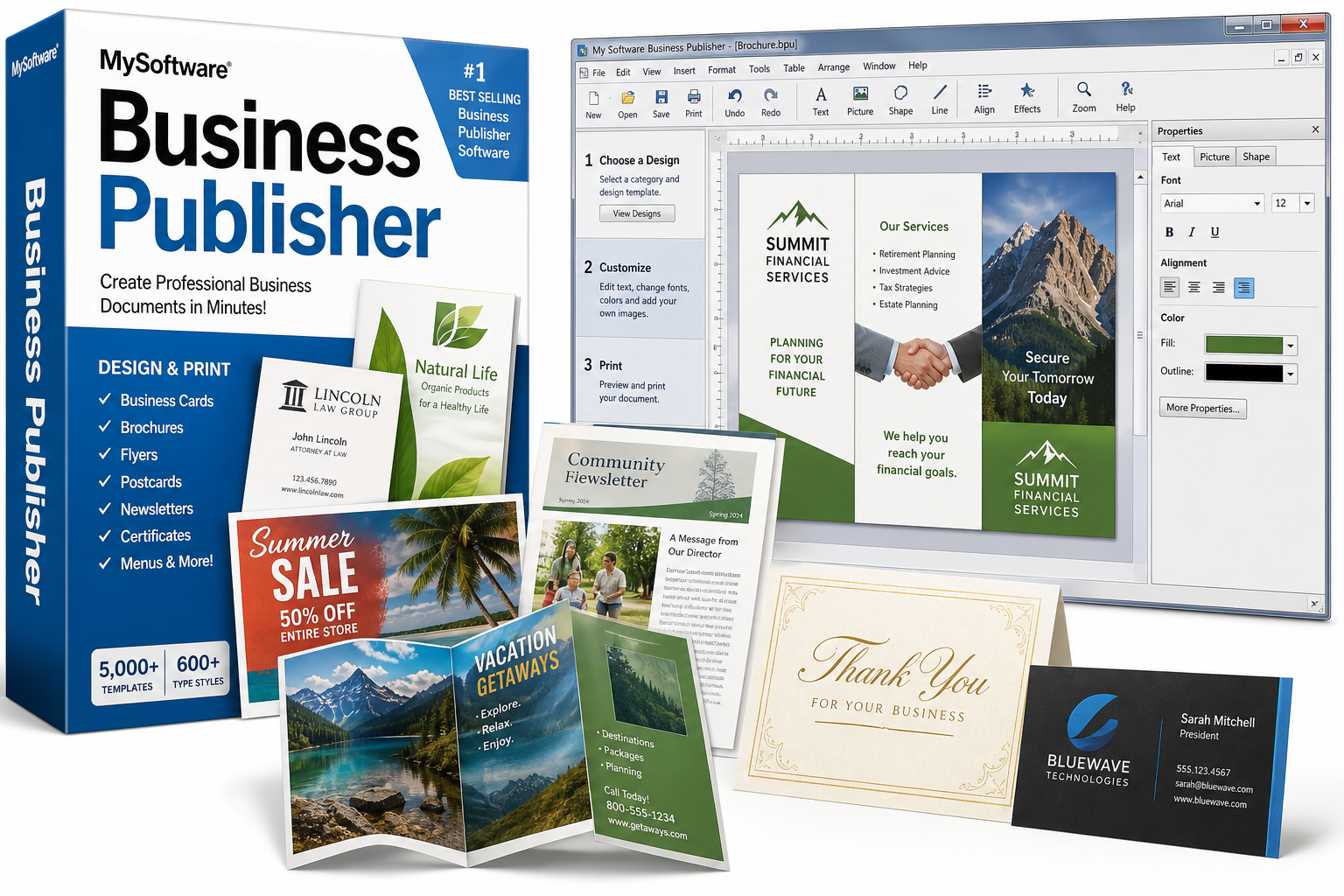
My Software Business Publisher is focused on print‑oriented business communication. The core capabilities typically include:
- Document types:
- Business cards, letterheads, and envelopes
- Postcards and greeting cards
- Flyers, brochures, menus, and price lists
- Newsletters and certificates
- Template‑driven design:
- A large collection of pre‑designed layouts (often quoted in the thousands) targeted at small businesses.
- Templates with placeholder text and image areas, which you replace with your own content.
- Graphics and typography tools:
- Hundreds of type styles and a broad font selection for varying design tastes.
- Text effects such as gradients, shadows, and warping to add emphasis.
- Basic image adjustment tools (brightness, contrast, simple corrections).
- Rotation of text and graphics for more flexible layouts.
- Color and layout controls:
- An extended color palette for branding and highlighting.
- Simple alignment, margin, and spacing controls to keep documents print‑ready.
- Utility tools for small businesses:
- An integrated address book for managing mailing lists.
- A spell checker to help catch typographical errors before printing.
Overall, the software is clearly optimized for print output, not web or social media graphics. You can expect standard paper‑size layouts for inkjet or laser printing rather than responsive or digital‑first formats.
Workflow and Ease of Use
The application is built around a three‑step workflow:
- Choose a format and template – Select the type of document (e.g., business card, brochure) and then pick a layout from the template gallery.
- Customize content – Replace placeholder text with your business information, insert a logo or graphics, and tweak colors, fonts, and layout to better match your branding.
- Prepare for printing – Use built‑in printer alignment tools to adjust margins, page orientation, and card or label alignment before printing on standard paper or specialty stock.
This guided approach is helpful if you rarely work with design software and want a minimal learning curve. Advanced graphic designers may find the control set restrictive compared to professional tools, but that is not the primary audience for this product.
System Compatibility and Technical Considerations
A critical aspect of evaluating MySoftware My Software Business Publisher today is its age and platform support:
- Designed for Windows XP, Vista, 7, and 8 environments.
- Not officially targeted at Windows 10 or 11, and user feedback from some retailers suggests stability and compatibility problems on newer systems (difficulty installing, loading, or running the program, as well as problems with core functions like importing images and working with modern document formats).
Because of this, the software is best considered for:
- Users maintaining an older Windows PC specifically for legacy applications.
- Situations where offline, self‑contained software is preferred over cloud tools.
If your primary machine runs a modern operating system, you should be prepared for potential workarounds (compatibility modes, virtual machines, or older hardware) or consider alternative, actively supported desktop publishing software.
User Experience
Interface and Learning Curve
The interface reflects its early‑2000s origins: toolbars, menus, and dialog boxes instead of the cleaner ribbon‑based or modern UI patterns you see in newer apps.
Pros for non‑technical users:
- Clear step‑by‑step process (select format → customize → print).
- Heavy reliance on templates means you can get an acceptable result without understanding advanced design principles.
Potential drawbacks:
- Dated look and feel compared to contemporary software.
- Limited screen optimization for today’s high‑resolution monitors.
- Fewer real‑time, visual editing aids than modern tools (e.g., fewer smart guides, limited live previews of complex effects).
Performance and Stability
On compatible, older systems, this type of software generally runs smoothly and quickly because its resource requirements are modest. The main performance concerns come from attempting to run a legacy application on unsupported operating systems.
Some editorial summaries and user comments from third‑party retailers note:
- Difficulty installing or loading the application on modern Windows versions.
- Inability to reliably upload or import certain images.
- Lack of support for newer Microsoft Office or Publisher file formats.
These limitations may or may not affect you depending on your environment, but they are important to weigh before purchasing.
Output Quality
For basic printed materials, Business Publisher can produce:
- Clean, legible brochures and flyers targeted at local advertising.
- Professional‑looking business cards using standard templates.
- Simple newsletters, certificates, and office forms.
Print quality ultimately depends on your printer and paper stock. The software itself is adequate for standard small‑business needs, but it does not attempt to compete with modern professional page‑layout tools in color management, typography precision, or print‑shop‑grade prepress controls.
Pros
- Template‑driven design: Large library of ready‑made layouts for common business documents reduces design time.
- Beginner‑friendly workflow: Three‑step process is understandable for users with no design background.
- Broad document support: Handles a wide range of common small‑business marketing pieces (cards, brochures, flyers, newsletters, menus, price lists, and more).
- Text and image effects: Built‑in type treatments and basic image adjustment tools add visual interest without advanced skills.
- Utility tools for small offices: Integrated address book and spell checker support mailings and error‑free copy.
- One‑time purchase: No subscription model; once you acquire the software for around $16.99, there are no ongoing license fees tied to this version.
Cons
- Legacy product: Originally released decades ago; no indication of active, modern development.
- Limited OS compatibility: Intended for Windows XP through Windows 8; users report problems on Windows 10 and later.
- Dated interface: Older UI conventions and less polished visual design compared to current applications.
- Weak modern format support: Not suitable if you need seamless integration with up‑to‑date Microsoft Office formats or cloud workflows.
- Questionable long‑term viability: Because it is not a current product, you should not expect feature updates, security patches, or enhanced compatibility.
Value Assessment
Evaluating the value of MySoftware My Software Business Publisher depends heavily on your environment and expectations.
- If you maintain an older Windows PC and want simple, template‑based print projects without learning complex design tools, Business Publisher can still deliver usable results. In that narrow scenario, the one‑time cost of $16.99 may be reasonable for occasional marketing materials such as business cards, flyers, and newsletters.
- If you run a modern Windows 10 or 11 system, the potential compatibility issues and lack of active support significantly undermine its value. Modern alternatives (including low‑cost or free solutions) may yield better long‑term reliability and flexibility.
- For businesses that require brand‑consistent, frequently updated collateral, or who share files across teams, this legacy software will feel restrictive compared to current cloud‑based design platforms or up‑to‑date desktop publishing applications.
In short, the product’s value is highest for cost‑conscious users with compatible legacy hardware who prioritize ease of use and offline operation over modern features and integrations.
Final Thoughts
MySoftware My Software Business Publisher is best viewed as a legacy desktop publishing tool for basic, print‑focused marketing projects. Its strengths lie in ready‑made templates, straightforward workflows, and a low barrier to creating acceptable‑looking business materials without design expertise.
However, its age, limited support for current operating systems, and dated interface make it a niche recommendation today. If you:
- Have an older compatible Windows machine;
- Need simple flyers, brochures, and business cards;
- Prefer a one‑time purchase around $16.99 instead of ongoing subscription fees;
then this software can still have a role as a low‑cost, offline solution. For most users on modern hardware – especially those who require up‑to‑date file compatibility, collaborative tools, or regular updates – more current publishing or design platforms will likely be a better long‑term choice.