
Ring Indoor Cam (1080p, 2nd Gen) Review: Compact Security for Homes and Small Businesses
Introduction
The Ring Indoor Cam, Home or business security in 1080p HD video, White is a small plug‑in camera aimed at users who want straightforward indoor monitoring without a complicated NVR setup. It records in 1080p HD, supports color night vision, offers two‑way audio, and integrates tightly with the Ring ecosystem and Alexa.
While the exact cost will vary over time, it typically sits in the budget to midrange segment for smart cameras, and is often available around $49.99 on Amazon. The question is whether its feature set and day‑to‑day experience justify choosing it over other compact indoor cameras—or over Ring’s own more advanced models.
Setup / Getting Started
Unboxing and What’s Included
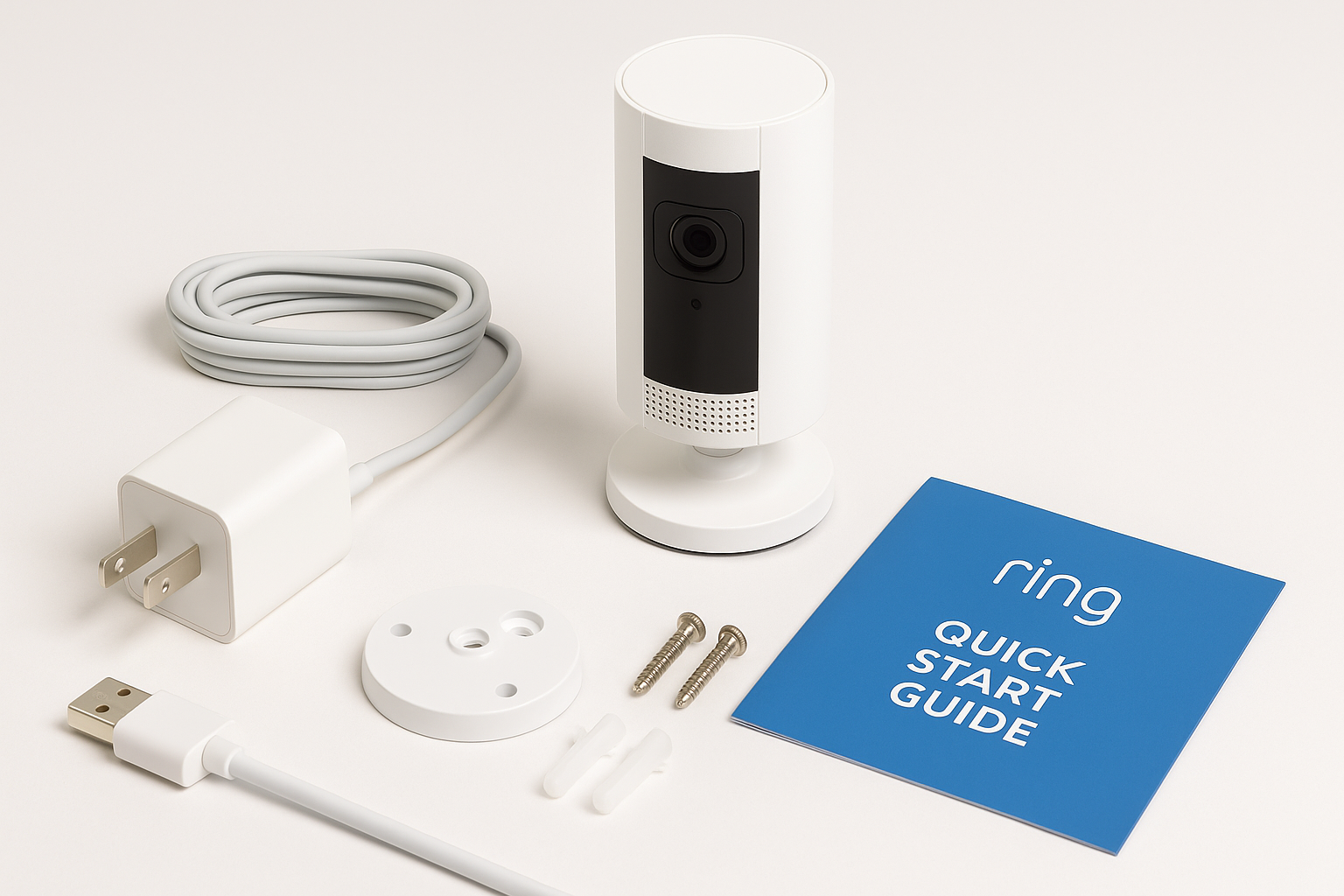
In the box, you can expect the basics you need to get running quickly:
- Ring Indoor Cam (white finish)
- Plug‑in power adapter with USB cable
- Mounting base/stand
- Screws and wall anchors for optional wall mounting
- Quick start documentation and a Ring security sticker
The camera itself is compact and light, with an integrated stand that doubles as a mounting plate. This makes it easy to place on a shelf or fasten to a wall or ceiling.
Physical Installation
- Choose a location: For home use, this is typically a living room, hallway, entryway, nursery, or home office. For small businesses, common locations include reception areas, storage rooms, and point‑of‑sale zones.
- Power it up: Plug the adapter into a standard indoor outlet and connect the cable to the camera. The status light guides you through the next steps.
- Mount or place: You can leave the camera free‑standing on a flat surface or use the included hardware to mount it. The adjustable stand lets you tilt and angle the view without special tools.
Installation does not require drilling if you choose a tabletop location, which is helpful for renters or temporary setups.
App Setup and Configuration
Using the Ring app (iOS and Android), the onboarding process is straightforward:
- Open the Ring app and tap to add a new device.
- Scan the QR code on the camera or in the quick start guide.
- Connect the camera to your 2.4 GHz Wi‑Fi network.
- Assign the device to a room or location (e.g., “Office,” “Back Room”).
- Configure key settings like motion zones, notification preferences, and linked devices if you use other Ring products.
Most users can complete setup in roughly 10–15 minutes, including app configuration. The camera’s dependency on a 2.4 GHz network is common in this category, but something to keep in mind if your router is set to 5 GHz only.
Daily Usage
Monitoring and Live View
Day to day, the Ring Indoor Cam is designed to be “set and forget.” Once configured, you primarily interact with it through the Ring app:
- Live View: Open the app or an Alexa‑enabled display (e.g., “Alexa, show me the living room”) to see real‑time 1080p video.
- Timeline and recordings (with Ring Protect subscription): Scroll through motion events, review clips, and download footage if necessary.
- Event alerts: Receive notifications on your phone whenever motion is detected in the defined zones.
The camera is well suited for quick spot‑checks: verifying packages just brought inside, checking on pets, or making sure a back office is closed up after hours.
Two‑Way Talk
Built‑in microphone and speaker enable basic intercom use:
- Talk to family members in another room.
- Remind kids to start homework.
- Communicate with staff or delivery personnel at a business entrance.
Voices are generally clear and audible, though there can be a slight delay depending on your network. It is more than adequate for simple conversations, but not intended to replace a dedicated intercom system.
Using the Privacy Cover
One of the standout quality‑of‑life features is the manual privacy cover:
- Slide the cover over the lens to disable video.
- The camera’s status indicators and app show that video is off.
- In most configurations, this also mutes audio, depending on how you’ve set privacy options.
This physical shutter is reassuring in spaces like bedrooms, home offices, or meeting rooms where people may be especially concerned about being recorded. It allows you to leave the camera plugged in but visibly disabled when privacy is more important than monitoring.
Smart Home Integration
For households already using Amazon’s ecosystem, integration is a key strength:
- Works with Alexa‑enabled smart displays and Fire TV to show a live feed on command.
- Can integrate with other Ring devices—doorbells, outdoor cameras, chimes—so one motion event can trigger multiple notifications or actions.
There is no built‑in local storage; recording and playback rely on cloud services, typically via a Ring Protect subscription. Users who prefer on‑device or local NAS recording should be aware of this before purchase.
Performance & Reliability
Video Quality
The camera records in 1080p HD with support for color night vision in many indoor lighting scenarios. In practical terms:
- Daylight and well‑lit rooms: Faces and text (such as labels or whiteboards) are generally clear enough for identification at typical indoor distances.
- Low light: The camera switches to night vision mode, providing usable monochrome or color‑assisted images that remain adequate for monitoring movement and basic detail.
- Field of view: The wide horizontal view allows coverage of most small‑to‑medium indoor rooms with a single placement, though extra cameras may be needed for complex layouts.
The image quality is designed for situational awareness rather than cinematic detail. As with many Wi‑Fi cameras, compression is noticeable if you zoom in heavily, but for most security uses—seeing who is where and when—it performs as expected for its class.
Motion Detection
Ring’s motion detection is one of the more mature implementations in the consumer space:
- Customizable motion zones: Limit alerts to doorways, hallways, or specific areas, reducing false alarms from background movement like a ceiling fan or TV.
- Sensitivity controls: Adjust how easily the camera triggers on small or distant movement.
- Scheduling: Create time windows when alerts are more or less aggressive (for example, during business hours vs. overnight).
Once dialed in, the camera does a good job of striking a balance between responsiveness and noise in your notification feed.
Connectivity and Uptime
The camera uses 2.4 GHz Wi‑Fi, which provides good range through walls but can be prone to interference on crowded networks. In a typical home or small office with a stable router:
- Live view connections are usually established within a few seconds.
- Motion events upload to the cloud and become viewable shortly thereafter.
- Outages are more often related to local Wi‑Fi issues or internet interruptions than to the camera itself.
Positioning the camera within strong Wi‑Fi coverage and keeping firmware updated through the Ring app goes a long way toward maintaining steady performance.
What Works Well
-
Simple, fast setup
The combination of QR code onboarding, guided app steps, and plug‑in power means you can be fully up and running without technical experience. -
Compact, unobtrusive design
The small white housing blends into most indoor environments—residential or commercial—without drawing too much attention. -
Manual privacy cover
A physical shutter helps address common privacy concerns and offers visible reassurance that the camera is not recording when closed. -
Solid 1080p image quality for the price
For a camera in the $49.99 range, daytime clarity and usable night vision are appropriate for monitoring entryways, rooms, and key interior spaces. -
Mature app ecosystem and Alexa compatibility
The Ring app’s interface, notification options, and device management are well developed, and voice integration with Alexa smart displays adds flexibility. -
Flexible placement options
The included stand and wall‑mount capability give you choices—from placing it on a shelf to mounting it above a door for a more comprehensive angle.
What Could Be Improved
-
Cloud‑dependent recording
The camera’s full potential effectively assumes you will subscribe to a Ring Protect plan for video history and advanced features. Users who prefer local or subscription‑free recording may find this limiting. -
No 5 GHz Wi‑Fi support
Support is limited to 2.4 GHz, which is fine for most users but less ideal in dense apartment buildings or offices where that band can be crowded. -
Compression and fine detail
While 1080p is adequate for most use cases, compression means fine details (like a badge across a large room) may not be crystal clear. Users needing very high forensic detail should consider higher‑resolution or wired systems. -
Limited on‑device intelligence
Compared with some AI‑focused competitors, object‑level detection (e.g., person vs. pet) and advanced analytics are more dependent on cloud features and subscriptions. -
Indoor‑only design
This is by design, but worth restating: the camera is not weather‑sealed and is intended strictly for indoor use. If you need to monitor semi‑outdoor spaces, a different Ring model is a better fit.
Overall Impression
The Ring Indoor Cam (1080p HD, white) is a well‑balanced indoor security camera that prioritizes ease of use, compact design, and tight integration with the broader Ring and Alexa ecosystems. Its 1080p video, color night vision, two‑way talk, and motion detection cover the core needs of most home users and small businesses, while the manual privacy cover addresses one of the biggest concerns people have with always‑on cameras.
Its main trade‑offs are its reliance on cloud recording, lack of 5 GHz Wi‑Fi, and image quality that, while solid, is not pushing the boundaries of current camera technology. For users already in the Ring ecosystem—or those who value a simple, reliable solution over maximum technical specs—the Ring Indoor Cam offers strong value in the $49.99 bracket.
If you are comfortable with cloud‑based recording and want a straightforward way to add indoor coverage to a Ring system or start a basic security setup for your home or business, this camera is a practical, no‑nonsense option worth considering.