
Roku 75-Inch Select Series 4K HDR Smart TV: Big-Screen Streaming Made Simple
Overview
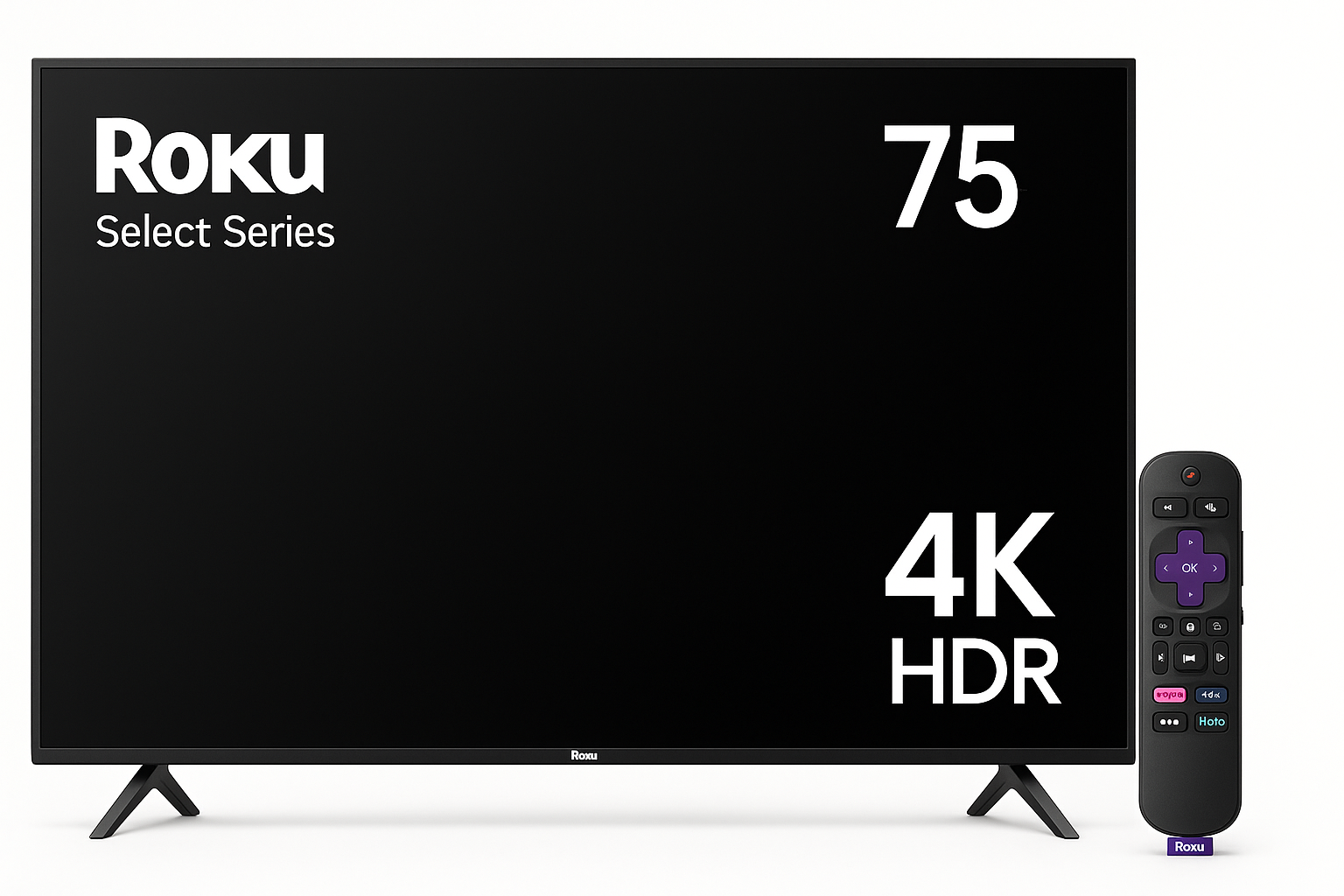
The Roku 75-Inch Select Series 4K LED Smart TV (75R4C5) is designed as an accessible entry into the big-screen category. It targets households that prioritize easy streaming access, straightforward setup, and a familiar Roku interface over premium extras like OLED or advanced local dimming.
With a 75-inch 4K UHD LED panel, HDR support, and Roku’s own smart TV platform built in, this model focuses on delivering a simple, unified experience for live TV, cable boxes, game consoles, and streaming apps. For shoppers in the market for a very large screen at around $24.99, the Select Series aims to balance size, features, and everyday usability rather than chasing flagship-level specs.
Standout Features
1. Integrated Roku Smart TV Platform
The biggest differentiator of this set is the integrated Roku TV platform. Instead of relying on an external streaming device, the TV ships with Roku built in, giving you direct access to major streaming services (Netflix, Disney+, Prime Video, Hulu, YouTube, and many more) via a clean, tile-based home screen.
Key benefits of the Roku interface include:
- Unified home screen for apps, HDMI inputs, live TV, and Roku’s own free content.
- App breadth and maturity, with thousands of channels and frequent updates.
- Simple navigation that’s easy for non-technical users to understand.
- Roku account integration to sync channels and preferences across devices.
For households already used to a Roku streaming stick or box, the experience will feel nearly identical—just without the extra dongle.
2. 75-Inch 4K UHD Screen
At 75 inches, this TV is aimed at larger rooms or home theater setups. The 4K UHD (3840 x 2160) resolution offers significantly more detail than 1080p, which becomes particularly noticeable on a screen of this size when you’re sitting relatively close.
Typical advantages of a 75-inch 4K panel in this class include:
- More immersive viewing for movies and sports.
- Sharper UI elements for streaming apps and menus.
- Better text clarity for in-app descriptions, guides, and captions.
3. HDR Support
The Select Series supports 4K HDR content, enabling higher contrast and a wider color range compared to SDR. While this model is not positioned as a high-end HDR powerhouse, compatibility with common HDR formats means it can take advantage of modern streaming content that’s mastered in HDR.
What this usually translates to in practice:
- Brighter highlights compared with standard dynamic range content.
- Slightly richer color reproduction on supported shows and movies.
- A more modern viewing experience for services that prioritize 4K HDR.
4. Enhanced Voice Remote
This TV includes an enhanced Roku voice remote, which offers more than the basic directional-pad functionality:
- Voice search and control for launching apps, searching across services, or switching inputs using spoken commands.
- Direct app buttons for quick access to popular services.
- TV power and volume control, reducing the need for multiple remotes.
For many users, voice search is especially helpful when you’re unsure which streaming service carries a particular movie or show.
Supporting Features
Beyond its headline capabilities, the Roku 75-Inch Select Series includes a set of supporting features aimed at improving everyday use.
Multiple HDMI Inputs
The TV provides multiple HDMI inputs to connect devices such as:
- Cable or satellite boxes
- Game consoles
- Blu-ray or UHD Blu-ray players
- Streaming boxes (if you prefer an alternate platform)
Inputs are recognized within the Roku interface and can be renamed (e.g., "Game Console" or "Cable Box") to simplify navigation.
Built-In Wi‑Fi and Ethernet (Where Provided)
Integrated Wi‑Fi allows the TV to connect to your home network without additional hardware. Depending on the exact variant and region, an Ethernet port may also be available for wired connectivity, which can provide more stable streaming for 4K HDR content.
Basic Audio with Soundbar Compatibility
The Select Series includes built-in speakers adequate for general TV viewing, news, and casual content. For more cinematic audio, you can connect:
- A soundbar over HDMI (ARC/eARC, depending on the exact configuration)
- An AV receiver for multi-channel setups
Roku also markets wireless audio products that work seamlessly with Roku TV, making it straightforward to upgrade the sound as your needs evolve.
Simple Setup and Guided Configuration
Initial setup is guided by on-screen prompts:
- Connect power and your antenna/cable or devices.
- Choose language and region.
- Connect to Wi‑Fi.
- Sign in or create a Roku account.
- Let the TV download any available software updates and sync your preferred streaming apps.
Most users can complete setup in under an hour, including app logins.
Usability
Interface and Navigation
Roku’s interface has a reputation for simplicity and consistency, and that carries over to this TV. The main home screen presents large tiles for apps and inputs, with text labels that are easy to read from a distance.
Navigation is straightforward:
- The Home button instantly returns you to the tile-based launcher.
- Directional navigation quickly moves between apps and settings.
- Voice search can jump to content or apps without digging through menus.
The learning curve is minimal, making this TV a strong option for households where not everyone is tech-savvy.
App Ecosystem and Updates
Because this is a Roku TV, you get:
- Regular firmware and app updates delivered over the air.
- Access to both major services and a wide variety of niche channels.
- Roku’s universal search, which can show where a title is available across supported streaming platforms.
The platform generally remains responsive over time, especially if you periodically close apps or restart the TV when performance feels sluggish.
Remote and Control Options
In addition to the physical remote, you can use the Roku mobile app (where available) to:
- Control the TV via your phone.
- Use private listening with headphones.
- Browse and launch content more quickly using a virtual keyboard.
This versatility is helpful in multi-user homes and reduces friction when entering long passwords or searching complex titles.
Performance
Picture Quality
As a 4K LED TV in the Select Series tier, the Roku 75R4C5 is tuned for mainstream viewing rather than professional-grade calibration.
In typical use, you can expect:
- Crisp detail in 4K content, especially from close to moderate viewing distances.
- Competent color reproduction, with user-selectable picture modes (e.g., Movie, Standard, Vivid) to suit different environments.
- Moderate contrast relative to similarly priced 75-inch LED sets.
In darker viewing environments, some limitations common to mid-range LED panels—such as visible blooming around bright objects or blacks that appear dark gray rather than inky black—may be noticeable, especially to critical viewers.
HDR Experience
HDR content generally appears brighter and more dynamic than SDR, but this TV does not aim at the elevated peak brightness or deep local dimming found in premium models. In practice:
- HDR makes highlights and specular reflections pop more than standard content.
- Color volume is improved, but not at the level of top-tier QLED or OLED TVs.
If you primarily watch in a bright living room and value the immersive feel of a 75-inch screen over perfect black levels, the HDR performance should be adequate for the price class.
Motion Handling and Gaming
For sports and fast-paced content, the panel’s motion performance is typical of mid-range 4K LED TVs:
- Motion interpolation and related settings can help reduce perceived blur, though they may introduce a “soap opera effect” if pushed too far.
- Casual gamers will find input lag acceptable, particularly in any dedicated Game mode.
Competitive gamers may miss advanced gaming features such as very high refresh rates or variable refresh rate (VRR), which are more commonly found in higher-priced gaming-oriented models.
Audio
The built-in speakers are tuned for clarity in dialogue-heavy content but are limited by the physical constraints of slim TV cabinets. Expect:
- Clear enough voices for everyday viewing.
- Modest bass and dynamic range.
For movies, sports, and games in a large room, pairing this TV with at least a basic soundbar will significantly improve impact and immersion.
Pros and Cons
Pros
- Very large 75-inch screen for a more immersive viewing experience.
- Integrated Roku smart platform with a broad app ecosystem and simple navigation.
- 4K UHD with HDR support, suitable for modern streaming and UHD content.
- Enhanced voice remote for easier search and input switching.
- Multiple HDMI inputs to support various devices.
- Straightforward setup and regular software updates, making it beginner-friendly.
Cons
- Mid-range LED panel means blacks and contrast are not on par with OLED or high-end QLED alternatives.
- Basic built-in speakers that benefit from an external soundbar or audio system.
- Limited advanced gaming features, making it less ideal for competitive players who want cutting-edge specs.
- Design and materials are functional rather than premium, aligned with its value-oriented positioning.
Summary
The Roku 75-Inch Select Series 4K HDR Smart TV (75R4C5) is best suited for viewers who want a very large screen and an intuitive streaming experience without paying for top-tier display technologies. It emphasizes ease of use—thanks to the built-in Roku interface and enhanced voice remote—alongside a 4K HDR picture that is more than adequate for everyday movies, shows, and sports.
If your priorities are simplicity, app coverage, and screen size at around $24.99, this model represents a compelling value in the 75-inch category. Enthusiasts who demand the deepest blacks, highest brightness, or advanced gaming capabilities may want to step up to higher-end lines, but for many households, the Roku 75-Inch Select Series delivers a balanced, practical mix of features and performance for large-screen home entertainment.