
Roku Streaming Stick HD Review: Compact Streaming for Everyday Viewing
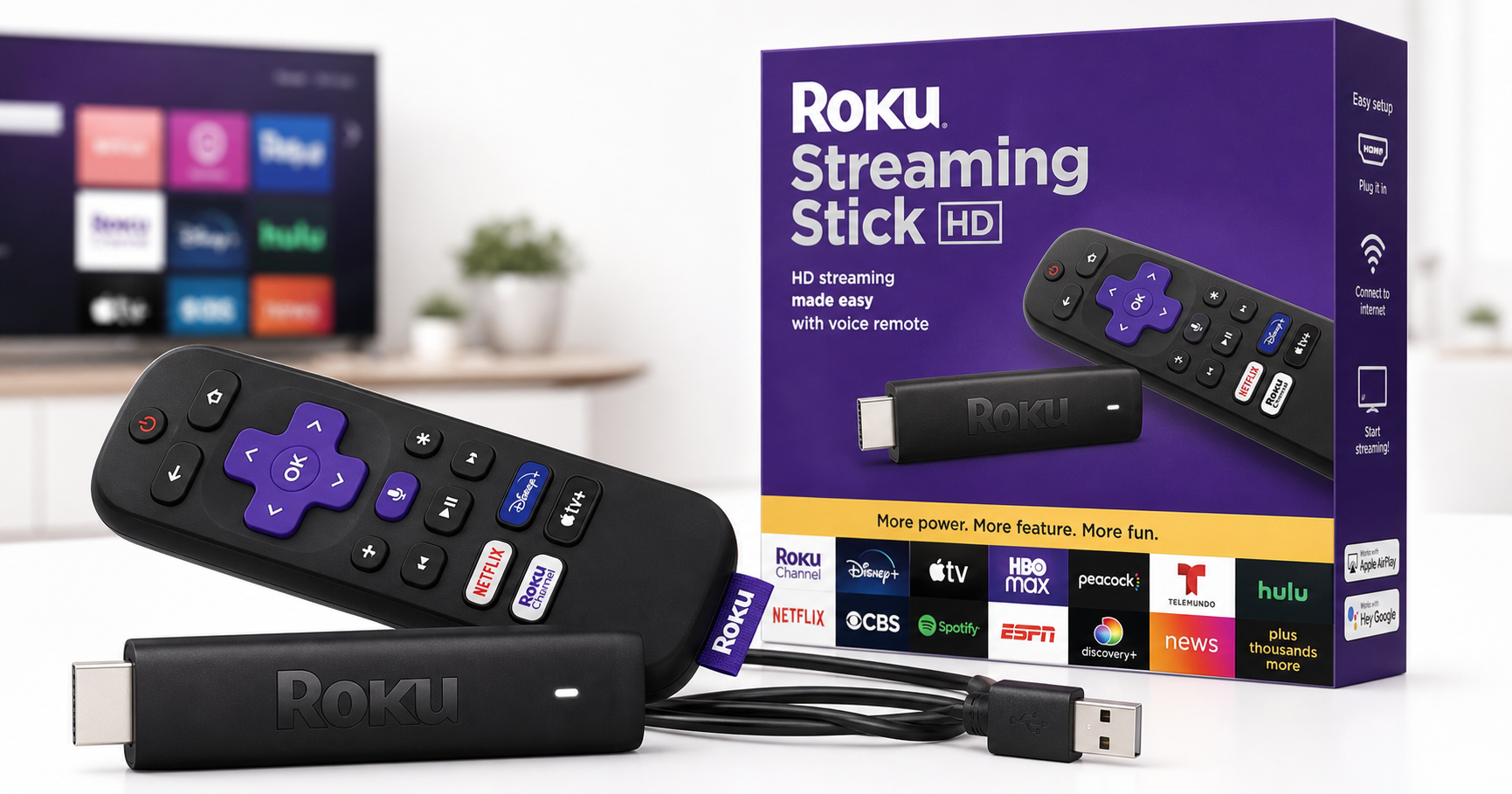
Product Context
The Roku Streaming Stick HD — HD Streaming Device for TV with Roku Voice Remote, Free & Live TV is designed for users who want a simple, plug-in streaming solution for an HDMI-equipped TV without adding another box to their media setup. Unlike set-top style streaming players, this model is a compact stick that plugs directly into the TV’s HDMI port and draws power from a USB port or wall adapter.
Positioned as an accessible, entry-level option, the Roku Streaming Stick HD targets households that:
- Primarily watch HD (720p/1080p) content rather than 4K HDR
- Want a straightforward interface for popular streaming apps
- Are interested in free, ad-supported channels and live TV streaming
- Prefer having a dedicated voice remote rather than relying on a phone app
It sits below Roku’s 4K-oriented devices in terms of resolution and advanced picture features, but aims to deliver a balanced mix of affordability, convenience, and content access. At around $29.41, it’s intended as a low-friction upgrade for older HDTVs or secondary rooms.
Feature Breakdown
Compact Streaming Stick Design
- All-in-one HDMI stick: The device connects directly to an HDMI port on your TV, reducing cable clutter and making it easy to move between rooms or take when traveling.
- USB-powered: Power is supplied via an included USB cable, either from a TV USB port (where sufficient power is available) or a wall adapter.
HD Streaming Support
- Resolution: Focused on HD playback (up to 1080p, depending on the connected TV and streaming service). This suits most non-4K TVs and users who stream primarily HD content.
- Streaming apps: Supports major services such as Netflix, Disney+, Prime Video, Hulu, and many more via the Roku Channel Store.
Roku Voice Remote
- Voice search and control: The included remote offers a built-in microphone for voice commands, allowing you to search for titles, actors, or genres without typing.
- Standard navigation layout: Directional pad, home, back, and playback controls provide familiar navigation for most users.
Free & Live TV
- Roku Channel integration: Access to a range of free, ad-supported movies and TV shows through the Roku Channel.
- Live TV guide: Aggregates compatible live and linear streaming channels into a guide-style interface, making it easier to browse what’s currently airing.
Roku OS Ecosystem
- Unified home screen: A simple tile-based interface that keeps installed channels and apps in one place.
- Cross-platform search: Roku’s search can scan multiple streaming services to show where content is available, often including price or subscription requirements.
- Regular software updates: Roku OS typically receives periodic feature additions and security patches that extend the stick’s useful life.
Performance Insights
Streaming Quality
For HD content, the Roku Streaming Stick HD is built to deliver consistent 720p or 1080p playback, depending on the source and your internet connection. When connected to a stable Wi‑Fi network, buffering is generally minimized and image quality remains stable, especially on mid-size HDTVs where HD resolution still looks sharp.
Because this model is focused on HD rather than 4K or HDR, it doesn’t target advanced videophiles or very large screens where the absence of 4K becomes more noticeable. However, on typical living room or bedroom HDTVs, the difference may be less critical for many viewers.
App Responsiveness
Roku’s interface on this stick prioritizes simplicity over heavy visual effects, which tends to keep navigation snappy. Opening common apps like Netflix or YouTube, launching the Roku Channel, and switching between services generally feels responsive enough for everyday use.
Performance can still depend on network conditions and app-specific optimization, but in normal conditions the device supports everyday streaming with minimal waits, particularly for users upgrading from older smart TV interfaces.
Network Connectivity
The Roku Streaming Stick HD relies on Wi‑Fi for connectivity. For most users with a reasonably modern router and Wi‑Fi coverage near the TV, this is sufficient for HD streaming. In homes with weak signals at the TV location, you may see occasional buffering or quality shifts, which can often be mitigated with better placement of the router or a Wi‑Fi extender.
Usability
Setup Experience
- Physical connection: Plug the stick into an HDMI port, connect the USB power cable, and switch the TV to the appropriate input.
- On-screen guided setup: The device walks you through connecting to Wi‑Fi, signing into or creating a Roku account, and installing popular channels.
- Account-based configuration: Once linked to a Roku account, apps and preferences can be restored or synced if you’ve used Roku devices before.
Remote and Navigation
- Ergonomic design: The Roku Voice Remote is compact but includes clearly labeled buttons for home, back, and playback control.
- Voice commands: Pressing and holding the microphone button allows you to search across channels, open apps, or control playback using spoken commands, which is particularly helpful for users who find on-screen typing cumbersome.
Accessibility and Quality-of-Life Features
- Simple home screen: Icons and layout are straightforward, which benefits less tech-savvy users.
- Mobile app support: Roku’s companion smartphone app (if used) adds optional features like keyboard input and private listening via headphones, further improving accessibility.
Trade-offs
While the Roku Streaming Stick HD offers a balanced set of features for HD streaming, it does come with some trade-offs to consider:
-
No 4K or HDR support
If you have a 4K TV or plan to upgrade soon, this HD-only model will not take advantage of higher resolutions and HDR formats. Users who want maximum picture fidelity on large or high-end TVs may prefer a 4K-capable Roku model. -
Wi‑Fi-only connectivity
There is no built-in Ethernet port, so reliability is tied to wireless network strength. In challenging Wi‑Fi environments, a streaming box with wired networking or a better-positioned router might offer more consistent performance. -
Limited advanced audio/video features
High-end audio formats and advanced HDR profiles are not the focus here. This is best suited for straightforward HD streaming rather than home theater enthusiasts optimizing every detail. -
Remote simplicity vs. advanced controls
The included Roku Voice Remote focuses on core functions and voice search. Users looking for remotes with more extensive TV control buttons or backlighting may find it comparatively basic. -
Value vs. future-proofing
At an accessible price point like $29.41, the Roku Streaming Stick HD offers strong value for current HD viewing. However, users planning to keep a streaming device through multiple TV upgrades may find a 4K Roku model to be more future-proof.
Conclusion
The Roku Streaming Stick HD — HD Streaming Device for TV with Roku Voice Remote, Free & Live TV is a practical choice for households that primarily watch HD content and want an easy, clutter-free way to access streaming services and free, ad-supported channels. Its compact stick design, user-friendly Roku OS interface, and voice-enabled remote make it approachable even for those who are not especially tech-savvy.
It is not aimed at users seeking 4K HDR performance or extensive home theater features, and it relies entirely on Wi‑Fi, which may be a limitation in some network setups. But for upgrading an older HDTV, equipping a secondary room, or providing a straightforward streaming solution at a budget-conscious level, this Roku stick offers a compelling mix of simplicity, content access, and everyday usability.
If your priority is reliable HD streaming, an intuitive interface, and access to a broad catalog of free and live TV content, the Roku Streaming Stick HD merits strong consideration within its class, especially at the $29.41 price point.